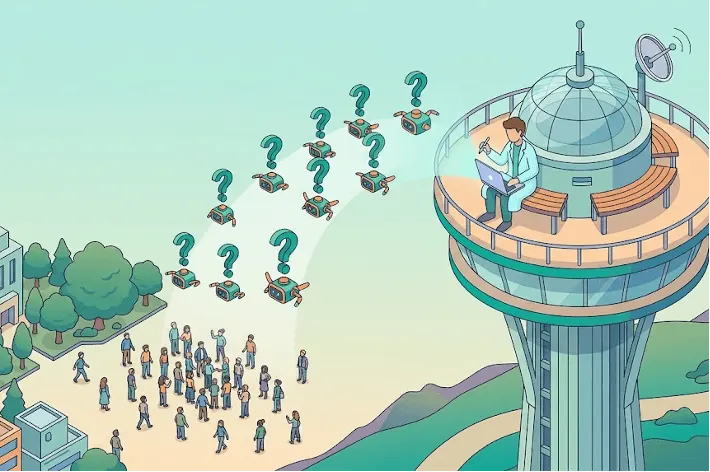
"Qual at scale" means collecting open, in-their-own-words answers from hundreds of people as easily as running a survey. Skimle Ask does it with a short AI interview: quick taps for stars, faces, scores and choices, then a conversation that asks why. Every tap becomes a number you can chart, and every reply is coded into themes you can count.
That is the short version. The rest of this guide shows how it works on one realistic study: a home and garden shop asking its customers about their last visit. You will see the guide we built, the 13 answer types it can use, how branching and follow-ups behave, what respondents actually see and type, the ways to send it (a link, a QR code, personal email links or an embed on your website or newsletter), and what happens behind the scenes when 24 responses come back.
Why do long rating surveys tell you so little?
Most customer experience surveys are built from the same brick: a statement and a 1 to 5 scale. One of them is useful. Fifty of them in a row is how a store ends up knowing its satisfaction score to one decimal place and nothing about why it moved.
The research on survey length is consistent. In a web survey experiment published in Public Opinion Quarterly, Galesic and Bosnjak found that the longer the announced length, the fewer people started and finished, and that answers to questions placed later in the questionnaire were faster, shorter and more uniform than answers near the beginning. That uniformity has a name in grid questions, "straightlining": a tired respondent picks 3 down the whole column. The one open box at the end ("Any other comments?") collects a "no" or nothing at all.
Asking open questions in a chat format helps. In a field study of about 600 people published in ACM Transactions on Computer-Human Interaction, Xiao and colleagues compared a standard Qualtrics survey with an AI chatbot asking the same open-ended questions. Across more than 5,200 free-text responses, the chatbot drew significantly more engagement and better answers on informativeness, relevance, specificity and clarity.
The practical lesson is to ask fewer closed questions, ask the open ones as a conversation, and let the closed answers steer what the conversation asks about. That is the design Skimle Ask is built around.
Why does "qual at scale" suddenly have a name?
In December 2025 Anthropic introduced Anthropic Interviewer, a Claude-powered tool for running structured conversations, piloted with 1,250 professionals. In that pilot, 97.6% of participants rated the experience 5 or higher out of 7 and 99.12% said they would recommend the format. Anthropic then used it to interview 80,508 Claude users in 159 countries and 70 languages, and described the result as the largest and most multilingual qualitative study ever conducted.
That put "AI interviewer" and "qual at scale" into conversations they had not been part of before. Skimle Ask is the same idea sized for a team, a customer base or a community: you do not need a model lab's research team to run one, and you get the analysis back in the same place as the answers.
Skimle Ask does not replace a skilled human interviewer. A 45-minute depth interview on a sensitive topic, or a study that has to hold up in a journal, still needs a person. We cover where the line sits in AI interviewing vs human interviewing. Skimle Ask is the lightweight end of the spectrum: five minutes, on a phone, with hundreds of people at once.
What is Skimle Ask?
Skimle Ask is an AI-conducted interview that anyone can set up in minutes and share as a link, a QR code, a personal email link or an embed. Respondents open it on a phone or laptop, answer a mix of quick closed questions and open questions, and the AI interviewer follows up where an answer is thin. There is no account, no app and no scheduling for them. You can try one yourself by answering this example employee experience interview, and the Skimle Ask docs cover every setting.
It sits in a different place to the tools you already use:
| Tool | Simple for | What you get back |
|---|---|---|
| Doodle | Finding a time everyone can do | A slot |
| Google Forms, Typeform, SurveyMonkey | Collecting structured answers and counting them | Scores and a column of short open-text replies |
| Skimle Ask | Collecting scores and the reasons behind them, in people's own words | Metadata columns from the taps, themes from the conversation, and both linked to each respondent |
If you are choosing between these tools for a specific project, our comparison of Typeform, SurveyMonkey, Google Forms and Skimle goes into more depth.
Watch it: a 50-question survey vs a five-minute Skimle Ask
The video below runs the whole example in about two minutes: a shopper giving up on a 50-question rating survey, the same shopper answering the Skimle Ask version on a phone (stars, a rating grid, a poster to react to, a photo and a recommendation score, with the AI asking why in between), and then the setup, sharing and analysis behind it.
How does Skimle Ask work? A fully worked out customer experience example
Harbour Street Home & Garden is a fictional independent shop that sells plants, compost, paint and hardware. The store manager wants to know how customers rate their visits and, more importantly, what would bring them back more often. The old approach was a 50-question satisfaction survey. The Skimle Ask version has nine questions and takes about seven minutes.
To build it, the manager answered one question in Skimle, "What do you want to find out?": "Customer experience at Harbour Street Home & Garden: how satisfied shoppers are with our staff, checkout, product range and prices, and what would make them visit more often." You can also start from one of 34 ready-made guides for common situations, or answer three short questions and let Skimle work out the brief. No account is needed to draft a guide; you create a free one when you are ready to open it to respondents.
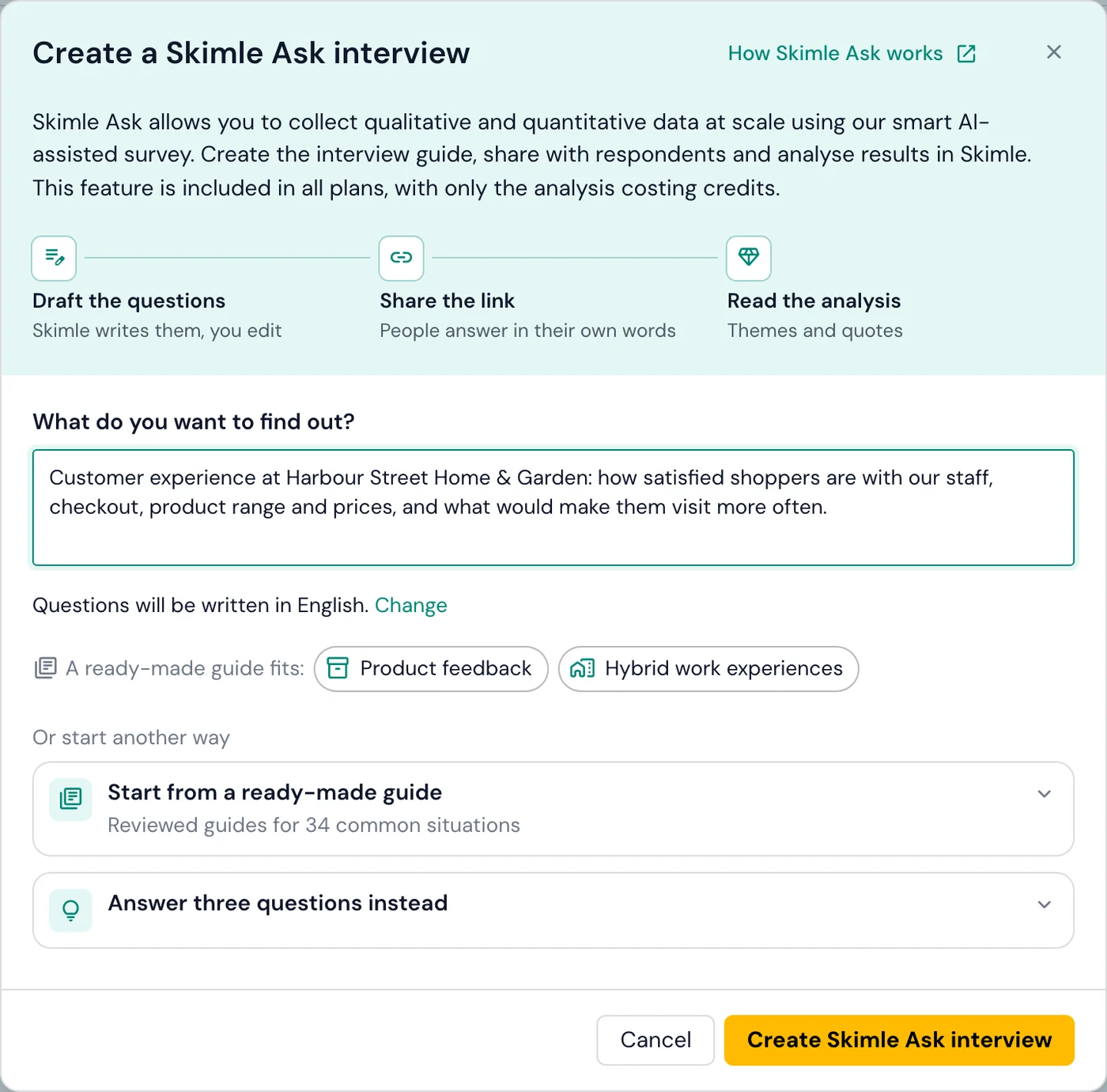
Skimle drafted an interview guide in under a minute. Once the draft guide is ready, you can freely add, edit and remove questions to perfect it. We edited it into this:
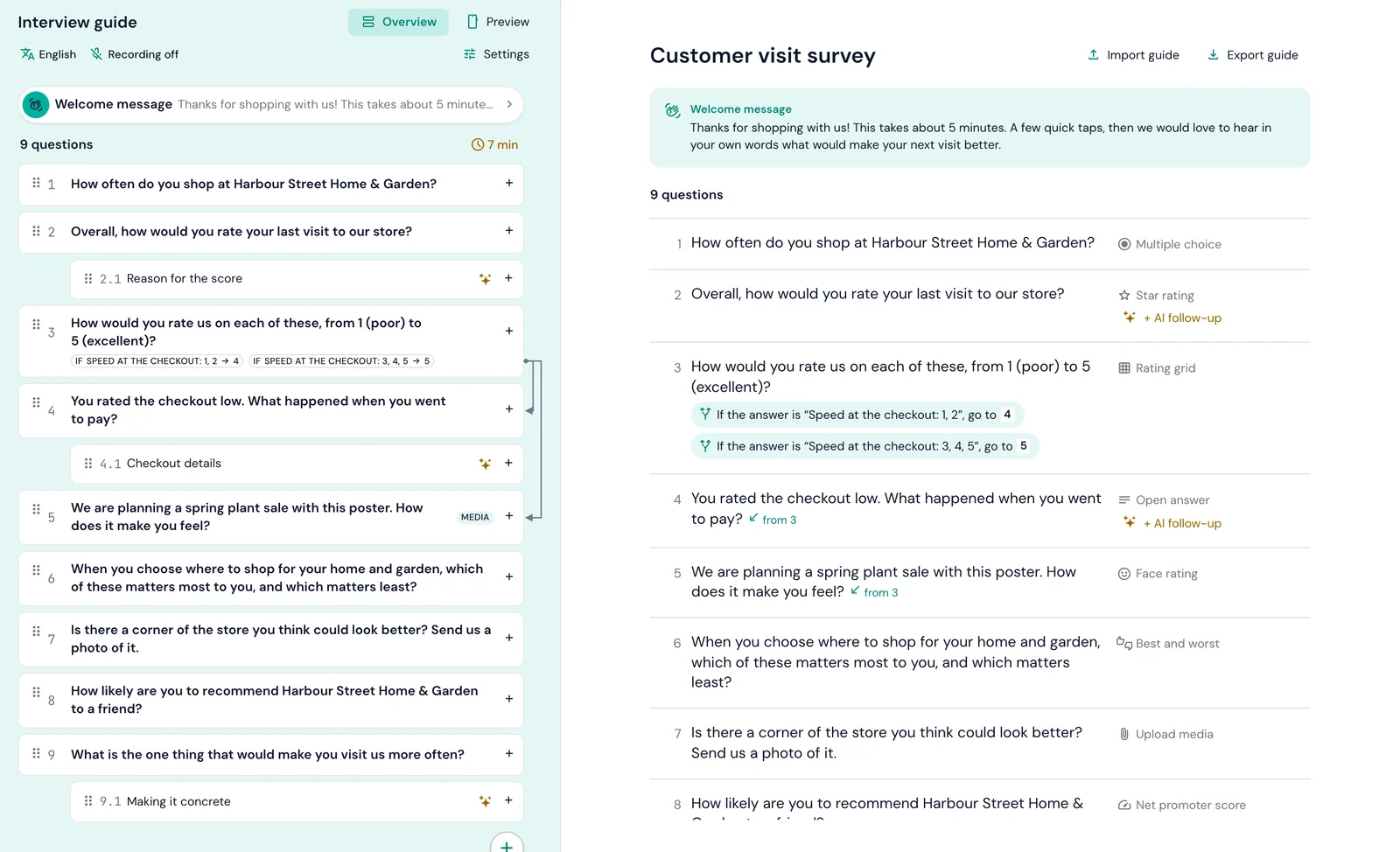
| # | Question | Answer type | What happens next |
|---|---|---|---|
| 1 | How often do you shop with us? | Multiple choice | Answer is instant; becomes the segment for later comparisons |
| 2 | Overall, how would you rate your last visit? | Star rating (1 to 5) | An AI follow-up asks for the main reason behind the score, up to two probes |
| 3 | How would you rate us on staff, checkout speed, range, value and finding things? (1 to 5) | Rating grid | Branches: checkout rated 1 or 2 goes to question 4, otherwise skips to question 5 |
| 4 | You rated the checkout low. What happened when you went to pay? | Open answer | Up to two AI probes on wait time, tills open and whether they nearly left |
| 5 | We are planning a spring plant sale with this poster. How does it make you feel? | Face rating, with the poster as an image | One tap on one of five faces |
| 6 | Which of these matters most to you, and which least? | Best and worst | Two taps |
| 7 | Is there a corner of the store you think could look better? Send us a photo of it. | Upload media (photos only) | Optional; the photo is kept with the response |
| 8 | How likely are you to recommend us to a friend? | Net promoter score (0 to 10) | One tap |
| 9 | What is the one thing that would make you visit us more often? | Open answer | Up to two AI probes to make the idea concrete |
The screenshot below shows that guide in the Skimle editor. The left column is the running order, with AI follow-ups indented under their questions and the two branch chips under question 3; the arrows on the right of the column show where each branch jumps. The overview on the right names each question's answer type, and the clock shows the estimated time to answer.
What does the respondent actually see?
We ran the interview with a set of 24 test respondents: scripted shopper personas typed by a browser robot, answering the live survey link so that every follow-up, branch and analysis step below ran for real. The interviewer's questions are the AI's own; the shoppers' answers are ours. Treat the numbers that follow as an illustration of the workflow, not as findings about real shoppers. The 24 responses were collected with the first six questions of the guide; we added the poster, photo and recommendation questions afterwards, so the analysis below does not include them.
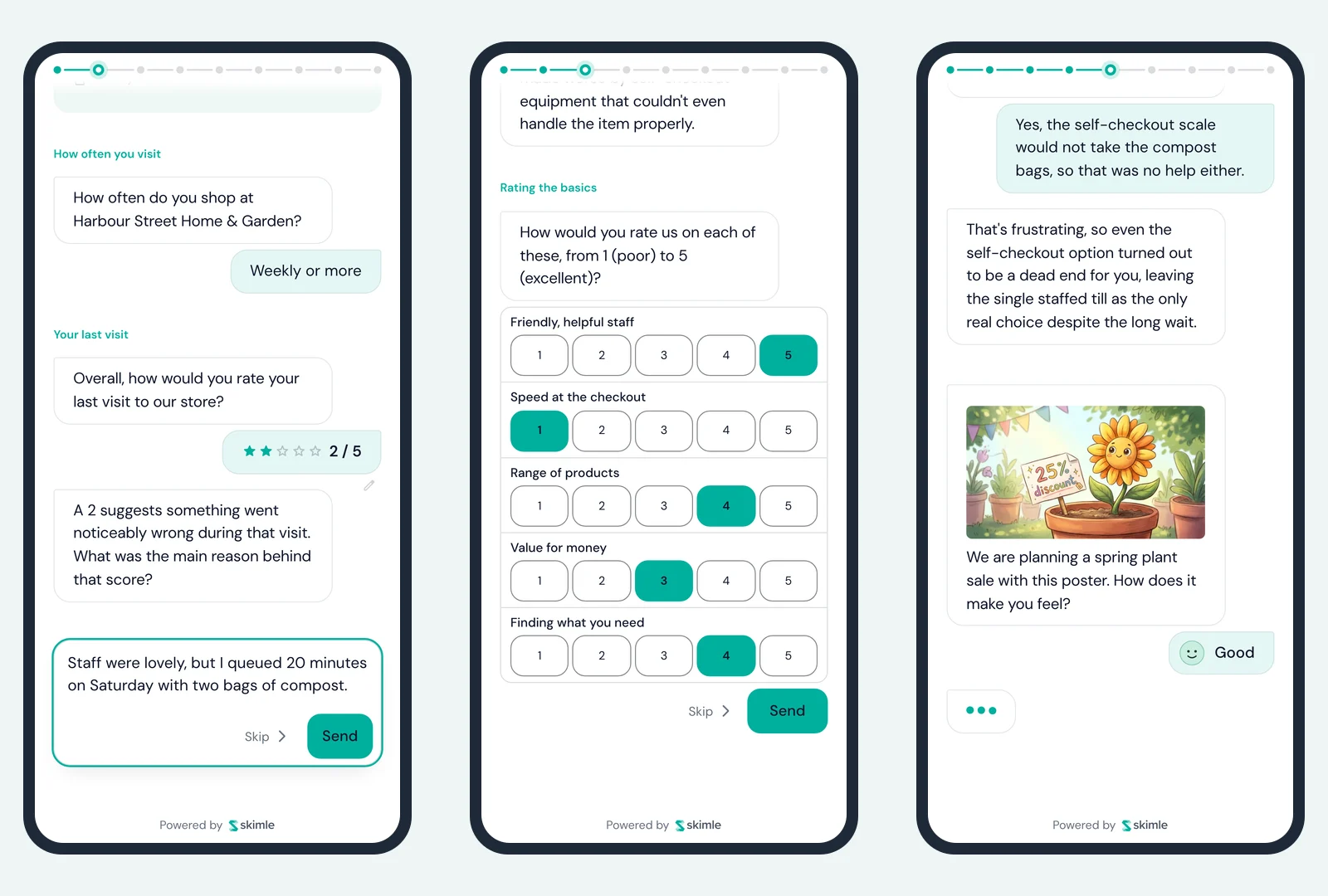
Here is how one of them, a weekly customer, went. The first two questions take two taps: a choice for visit frequency and two stars out of five. The rating of 2 is where a normal survey would move on, and where Skimle Ask asks why:
Interviewer: Sorry to hear that your last visit fell short, especially given how often you shop with us. What was the main reason behind that score?
Shopper: Staff were lovely, but I queued 20 minutes on Saturday with two bags of compost.
Interviewer: Friendly staff clearly weren't the problem. It sounds like the checkout wait was the real sticking point that dragged your visit down to a 2. Was that slow queue a one-off for Saturdays, or something you've noticed building up over your regular visits?
Shopper: One till open, and the self-checkout would not take the compost. Too heavy for the scale.
The follow-up does two things a static form cannot. It uses the frequency answer from question 1 ("given how often you shop with us"), and it separates the two things the shopper mentioned (staff and queue) to find out which one drove the score.
Next comes the rating grid: five rows on one screen, rated in five taps. Because this shopper gave checkout speed a 1, the branch sends them to question 4, which only the 9 shoppers who rated the checkout 1 or 2 ever see. The other 15 skip straight to question 5. Nobody who was happy with the till is asked about it.
Question 5 shows the shop's draft spring sale poster above the question and asks for a reaction on five faces. Images, sound clips and videos can sit on any question, which makes concept, packaging and advertising tests a one-tap job for the respondent. The three phone screens below show the star rating with its AI follow-up, the rating grid and the poster question as the respondent sees them. Their answers sit in mint bubbles on the right and the interviewer's questions in white on the left.
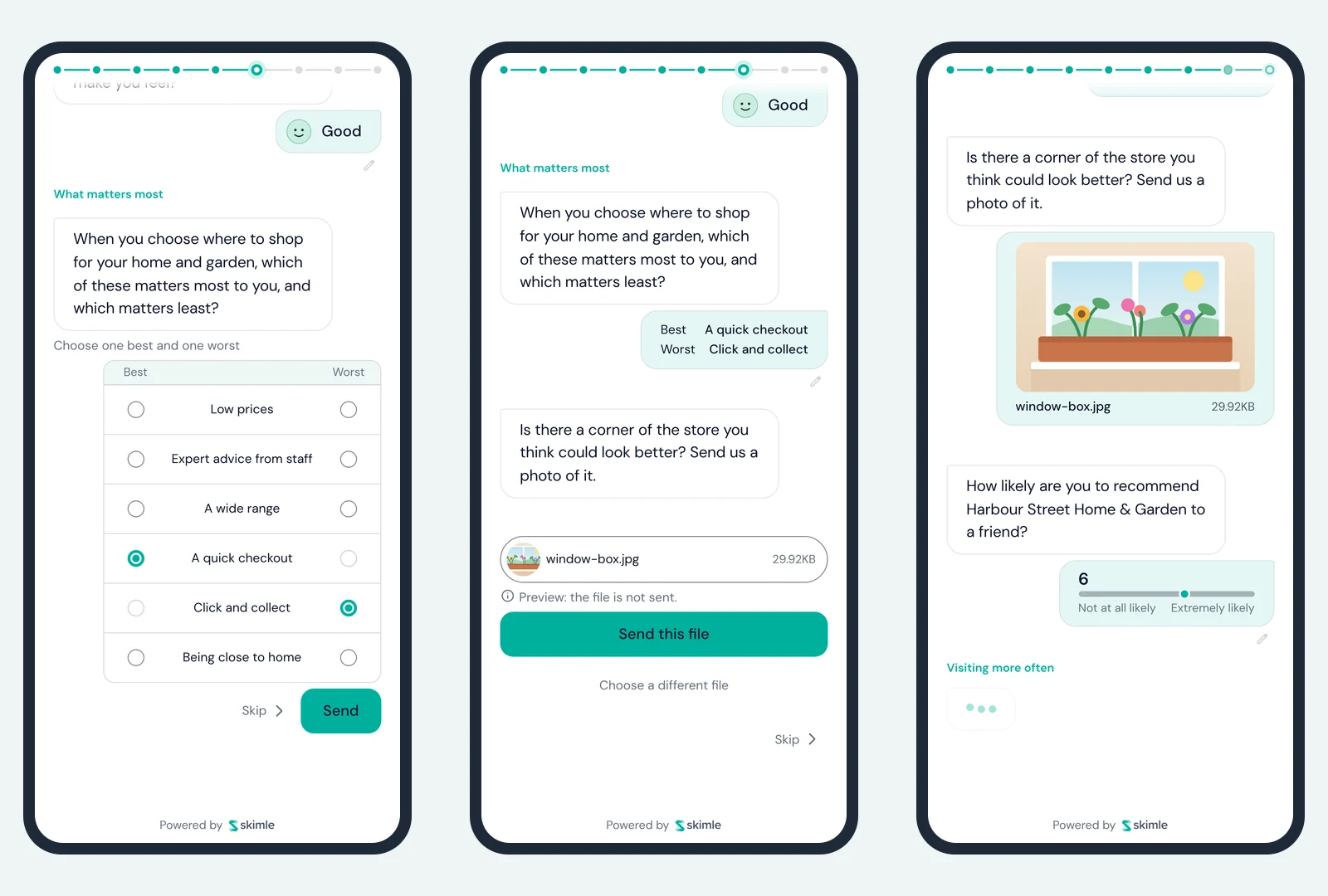
The best-and-worst question takes two taps. Question 7 asks for a photo of a corner of the store that could look better, which this shopper sends from their phone's camera roll, and question 8 is the standard net promoter score, here a 6.
The last question is the one the store manager cares about most. The AI follow-up is instructed to make the idea concrete and to ask about competitors, which turned "open a second till" into something the manager can act on:
Shopper: Open a second till on Saturday mornings. That is all it would take.
Interviewer: That's a refreshingly simple fix for what sounds like a recurring Saturday bottleneck. Have you ever skipped a Saturday trip altogether and bought elsewhere because of that single-till wait, and if so, where did you go instead?
Shopper: Between ten and one. I buy compost at the big DIY place now just to skip the queue.
That last sentence is the insight a 50-question survey would never have produced: a weekly customer is already buying a core product from a competitor, and the cause is a three-hour staffing gap.
Which question types does Skimle Ask support?
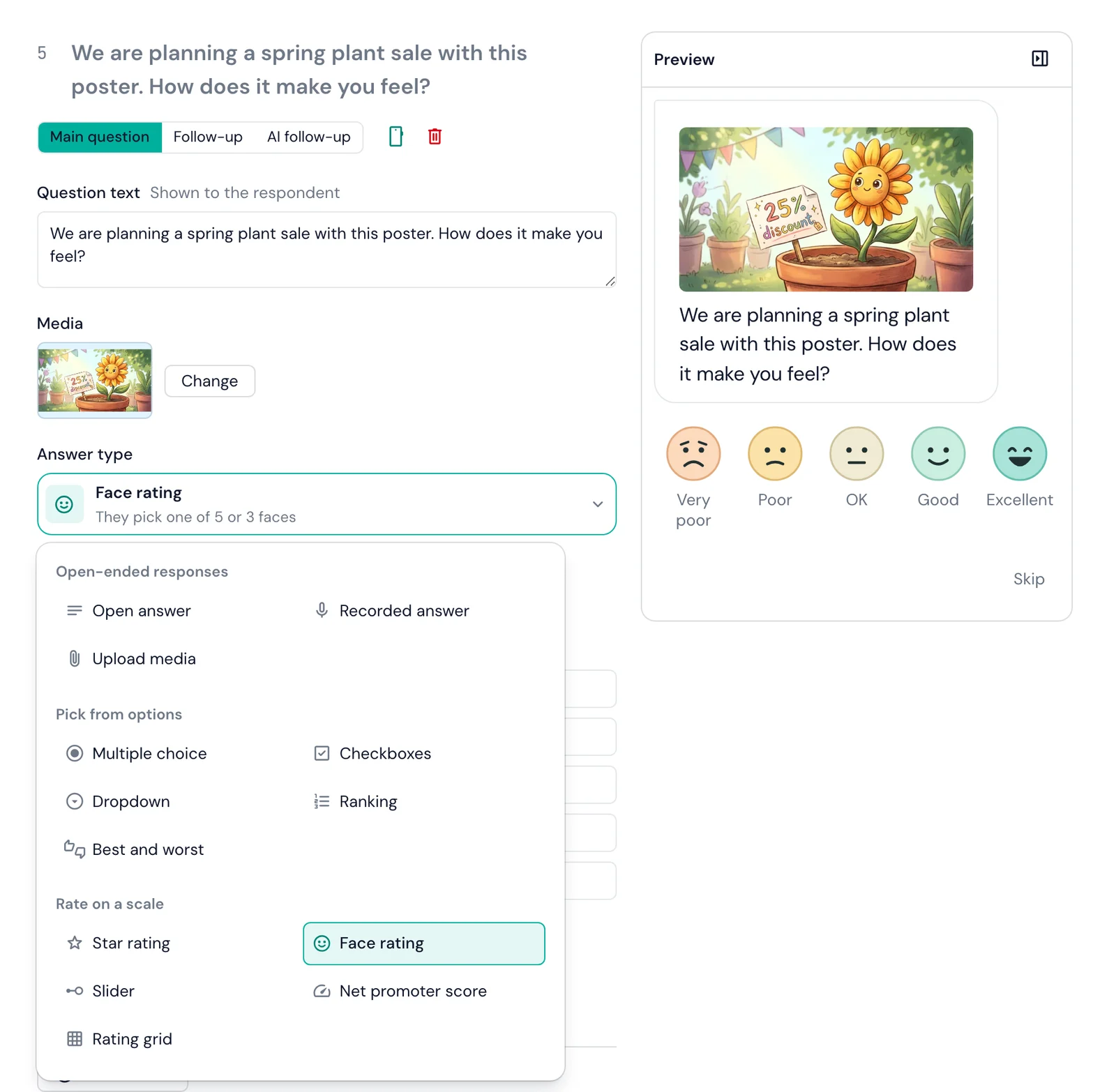
Skimle Ask has 13 answer types in three groups: answers in the respondent's own words, picks from options you write, and ratings on a scale. You pick one per question from the answer type menu in the guide editor, and the preview next to it shows what the respondent will see. Any question can also turn into a conversation by adding an AI follow-up under it, as we did for the overall rating.
| Answer type | What the respondent does | Good for | Becomes in analysis |
|---|---|---|---|
| Open answer | Types or dictates an answer | Reasons, stories, ideas | Themes and quotes |
| Recorded answer | Records a voice or video answer | Richer stories, tone, demonstrations | A transcript coded into themes, with the recording playable beside it |
| Upload media | Sends a photo, video or sound file | Shelf checks, home use, "show us" tasks | The file, kept with the response |
| Multiple choice | Picks one option | Segments, simple ratings | One metadata column |
| Checkboxes | Picks any number, with optional minimum and maximum | Channels used, products bought | One column with several values |
| Dropdown | Picks one from a long list | Region, store, job role | One metadata column |
| Ranking | Puts options in order | Priorities | One column holding the order |
| Best and worst | Picks the best and worst option from a list | What matters most and least | One column |
| Star rating | Gives 1 to 5 stars | Overall satisfaction | One numeric column |
| Face rating | Picks one of five or three faces | Quick emotional reactions, younger audiences | One numeric column |
| Slider | Picks a point on a numeric scale with end labels | Likelihood, agreement | One numeric column |
| Net promoter score | Scores 0 to 10 how likely they are to recommend | NPS programmes | One numeric column |
| Rating grid | Rates several items on one shared scale | Satisfaction drivers | One column per row of the grid |
A closed question answers instantly or with one "Send" tap, so it costs the respondent a few seconds. Any question can also carry an image, an audio clip or a video, uploaded or linked, with an introduction that is read before the media. A face rating on a poster, as in question 5, is a concept test in one tap.
How do branching and follow-ups work?
There are three ways to make an interview adapt, and they combine.
- AI follow-ups. An AI follow-up row under a question tells the interviewer how many probes it may ask (we used two) and what to probe for. The interviewer decides from the answer whether a probe is needed at all: a full answer gets none, a vague one gets a "why" or a "can you give an example". Your instructions are not shown to the respondent. Write them neutrally ("ask what happened at the till") rather than suggestively ("ask whether the queue made them want to leave"), and read a handful of transcripts after the first responses to check the probes are not leading.
- Authored follow-ups. A follow-up you write yourself, indented under a main question. It can be asked always, only if the main answer did not already cover it, or only if the answer matches something you describe.
- Conditional branching. A rule on a main question that jumps to a later question when the answer meets a condition. Each question type gets its own structured condition: a choice ("answer is one of these options"), a number range for a slider, first or last place for a ranking, best or worst for a best-and-worst question, or one grid row rated a particular way, as in our checkout rule. For anything a structured rule cannot express there is a free prompt ("the respondent mentions price"), which the AI evaluates.
Branches only jump forward, are evaluated after the question's follow-ups are finished, and point at a question by its identity rather than its position, so reordering or renaming questions does not break them. If a branch points at a question you later delete, the editor flags it and the interview continues in order rather than failing. A "Before you send" check lists anything like that before the interview goes out.
The interviewer also manages time. You set a target length, the editor shows how long the guide takes to answer, and if a respondent is falling behind the interviewer stops probing and moves on, so the last question still gets answered.
How do you send a Skimle Ask interview?
The Send step has three ways to reach people, and a switch for who may answer: open to anyone with the link, open only to people on your list, or closed, where nobody new can start but anyone already answering can finish.
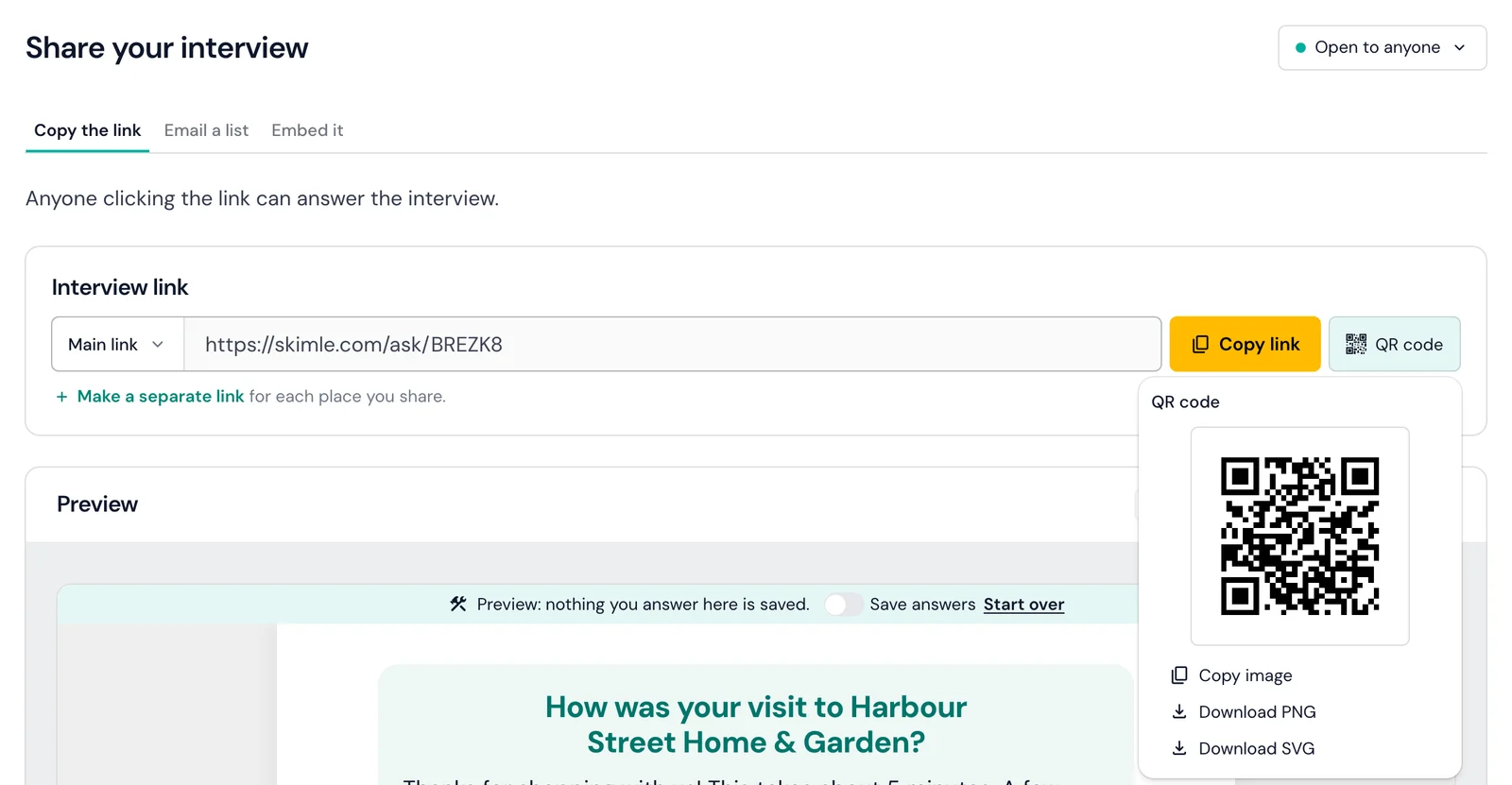
Links. One link opens the interview on any phone or laptop. The QR code beside it downloads as a PNG or SVG for a receipt, a poster or a slide. You can make a separate named link for each place you share it, such as "Receipt QR" or "Newsletter", and each answer is then marked with the link it came through, so you can compare channels or filter responses by source.
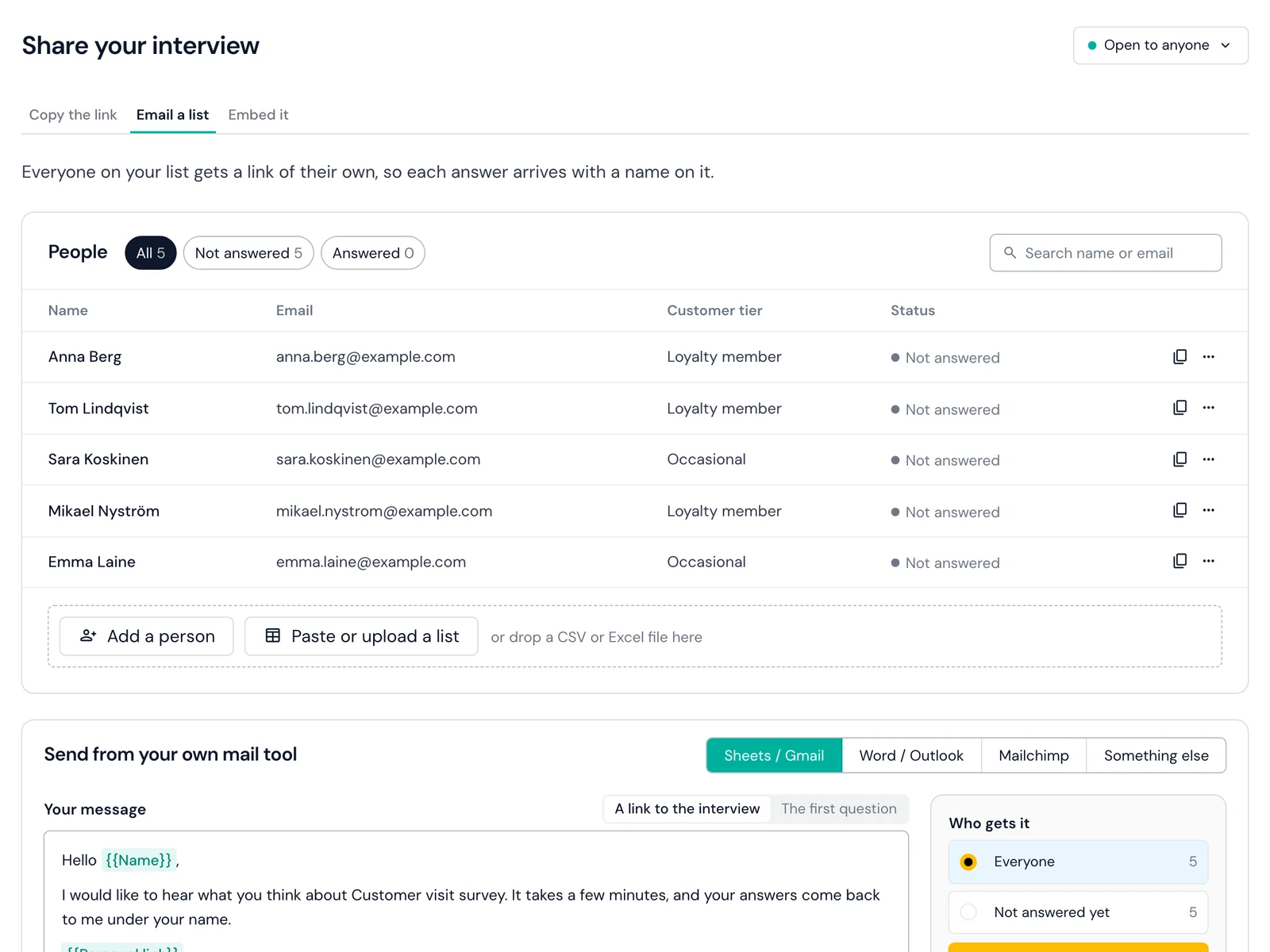
Email invitations. Paste or upload your people from a spreadsheet, a CSV or an Excel file. Everyone on the list gets a personal link, so each answer arrives with a name on it, and the table shows who has answered. Extra columns, such as the customer tier below, are kept with each person and travel into the analysis as metadata. Skimle does not send the emails itself: you send them from your own mail tool, and the Send step walks you through a mail merge in Gmail and Google Sheets, Word and Outlook, Mailchimp or anything else, with a ready message and a file of personal links to download. The message can carry a link or the first question itself.
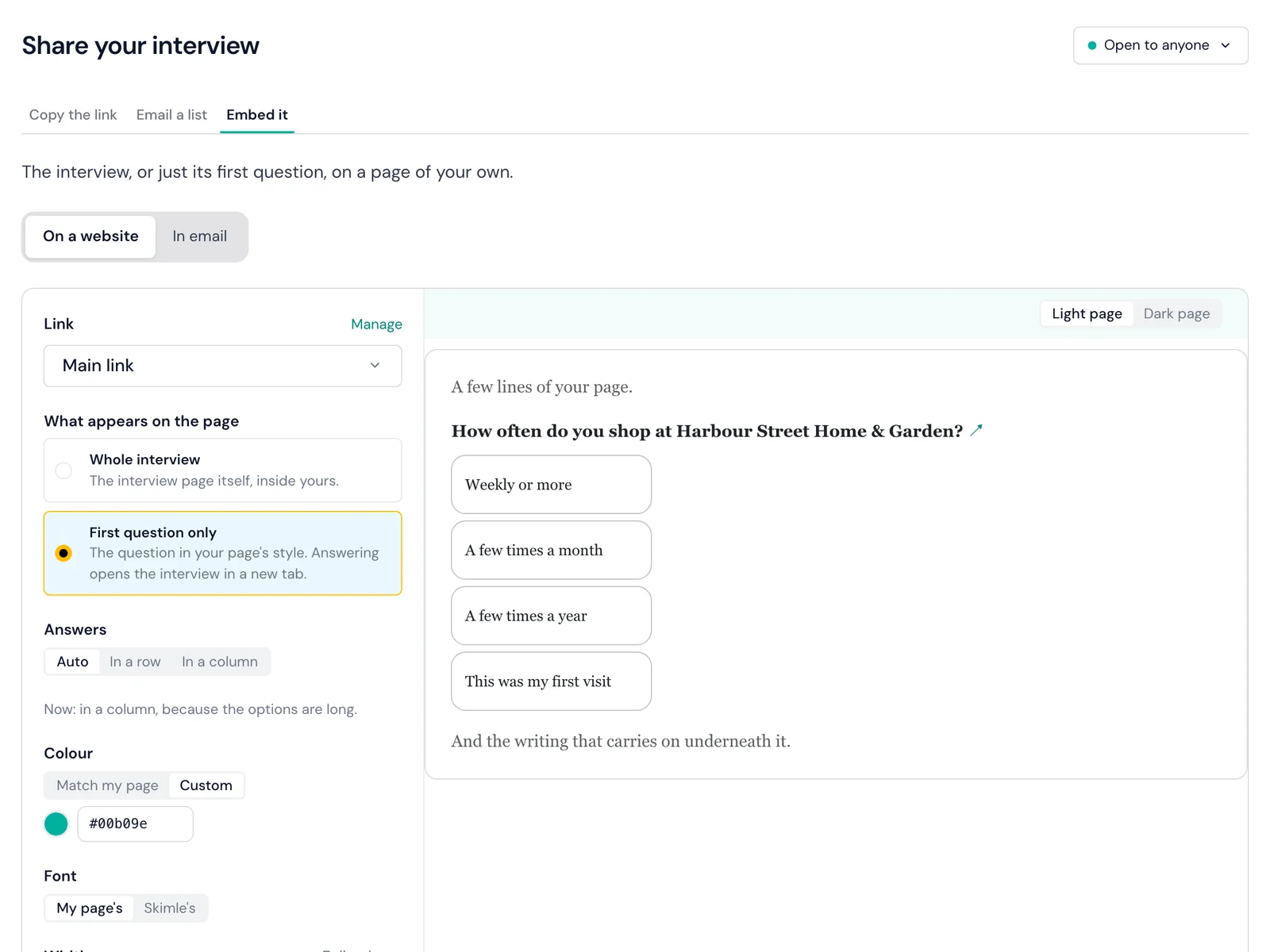
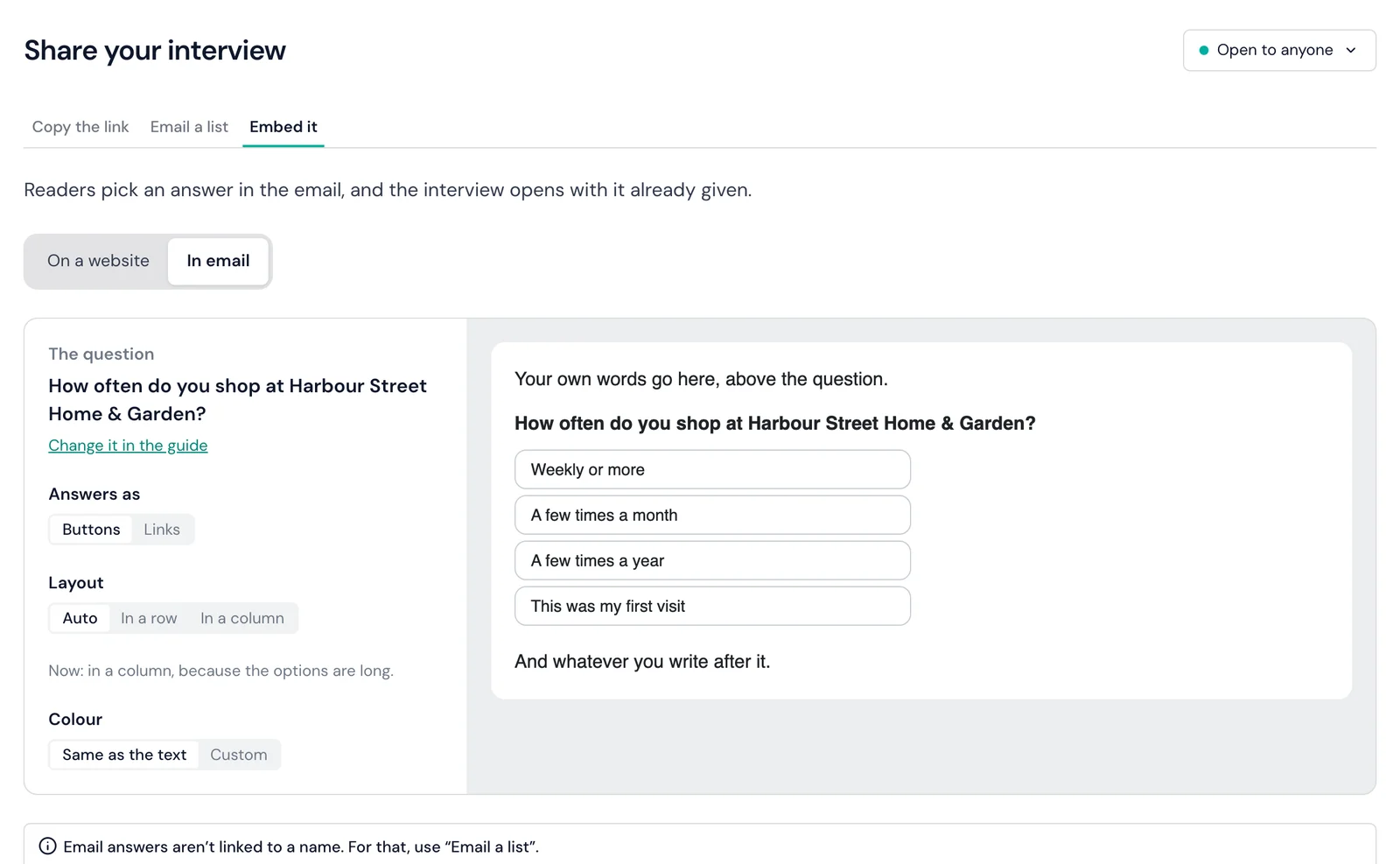
Embed it. On a website you can embed the whole interview, or only its first question in your page's own font and colours, where answering opens the interview in a new tab with that answer already given. You can set the colour, font, width, alignment and height, and preview the result on a light or dark sample page before copying the code.
The same first question can go into an email or a newsletter. Readers pick an answer right in the email, and the interview opens with that answer already given. It pastes into Mailchimp, Gmail, Outlook or your newsletter tool and takes on the email's font, size and colour. Answers from a newsletter are not linked to a name; use "Email invitations" when you need that.
If you run customer experience, brand or product research, see how Skimle fits market research and customer insights teams, including how teams combine Ask interviews with the feedback they already collect.
What happens behind the scenes when responses come in?
This is where Skimle Ask differs most from a survey tool with a chat skin. The responses do not land in a spreadsheet for someone to read. They land in a Skimle project, where the closed and open halves of every interview are analysed together.
Step 1: confirm the responses
New interviews arrive under "To confirm" on the Responses tab, where you can open any transcript, look at uploaded photos, play recordings and delete test runs or junk before anything is analysed. Unfinished interviews and your own previews have their own tabs, so they never mix with real answers. You can also have confirmed responses go straight into analysis. Each confirmed response becomes one document in the project. We covered how to spot bots and low-effort answers in fake respondents in qualitative research: 8 warning signs.
Step 2: every tap becomes a metadata column
When responses are confirmed, Skimle reads the closed answers out of each conversation and writes them as metadata. Visit frequency becomes a column. The overall rating becomes a column. The rating grid becomes five columns, one per row, because "Staff: 5; Checkout: 1" in a single cell could not be filtered or charted. Nobody codes anything by hand. The table below shows all 24 respondents after confirmation.
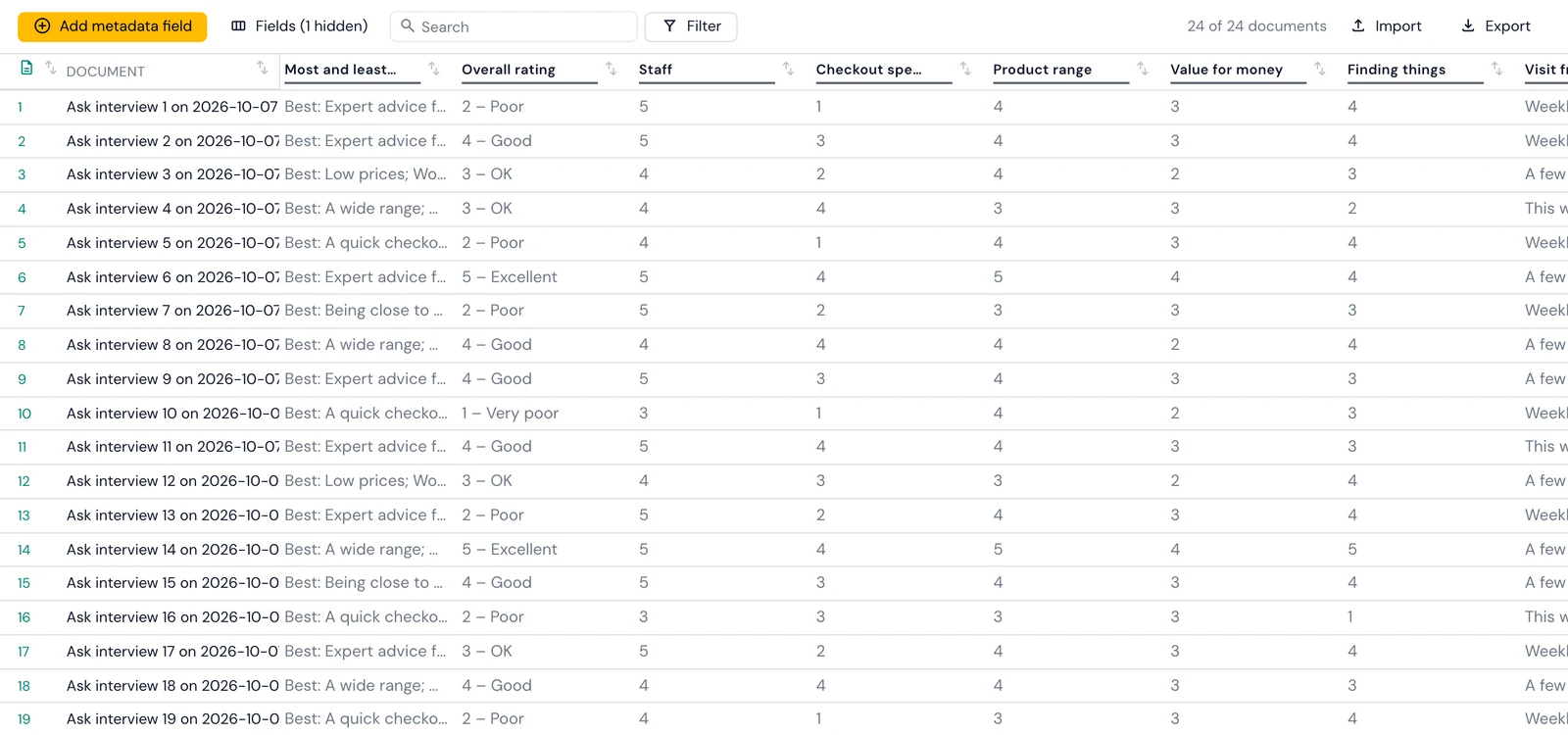
In this example the closed answers already tell a story. Weekly shoppers rated their last visit 2.4 out of 5 on average and the checkout 1.8, while every other group averaged between 3.3 and 4.3 overall. The most loyal customers are the least happy ones.
Step 3: open answers become themes
The open answers are coded passage by passage. Each passage becomes an insight, filed under a theme and linked to the quote it came from. In the first interview, "the staff were lovely as always" became an insight under staff friendliness, "I queued for nearly twenty minutes" and "only one till was open" went under till staffing and capacity, and "the self-checkout would not take the compost" went under self-checkout compatibility.
A Skimle Ask project starts with an analysis built from your questions, so each open question gets its own branch of themes. We also ran Skimle's identified themes analysis, which ignores the question structure and builds categories from what people said. Across the 24 interviews it produced 106 insights in 10 categories: checkout speed and queues led with 20 insights (till staffing alone had 8), followed by staff expertise and service with 13, and pricing, click and collect, store navigation, opening hours, loyalty and workshops behind them. Each category comes with a written summary whose claims cite the insights behind them.
Step 4: get numbers out of the conversations
This is the part that makes "qual at scale" useful to people who need a number for a slide. You can add a metadata field that Skimle fills by reading each conversation. We added two:
- What would bring them back, with allowed values such as faster checkout, click and collect, loyalty scheme, longer opening hours and clearer signage, and the instruction "the one change the respondent says would make them visit more often".
- Considered leaving without buying, with values left, considered it, no, or not mentioned.
The preview runs on a sample first, so you can check the instructions before filling all 24.
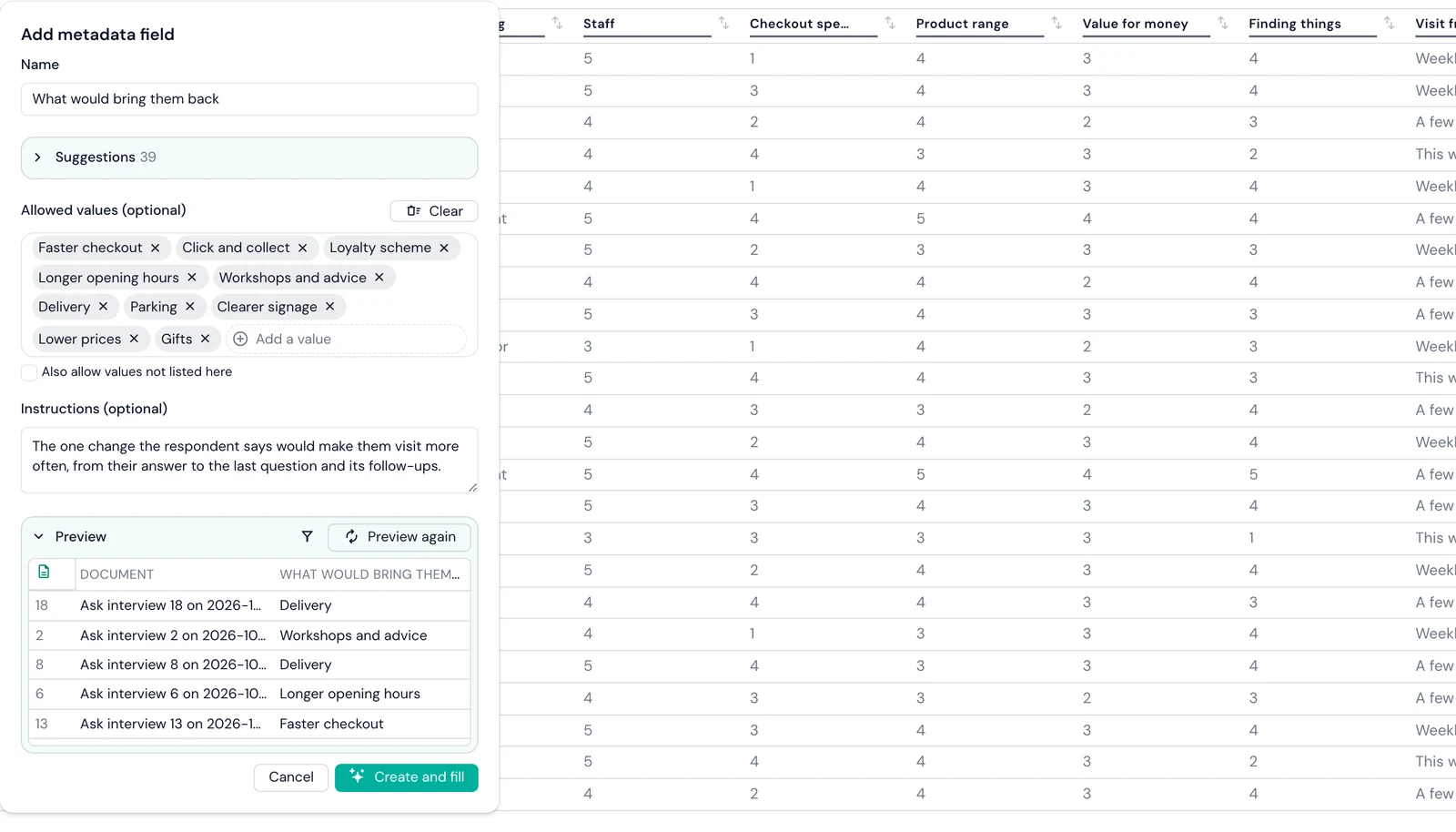
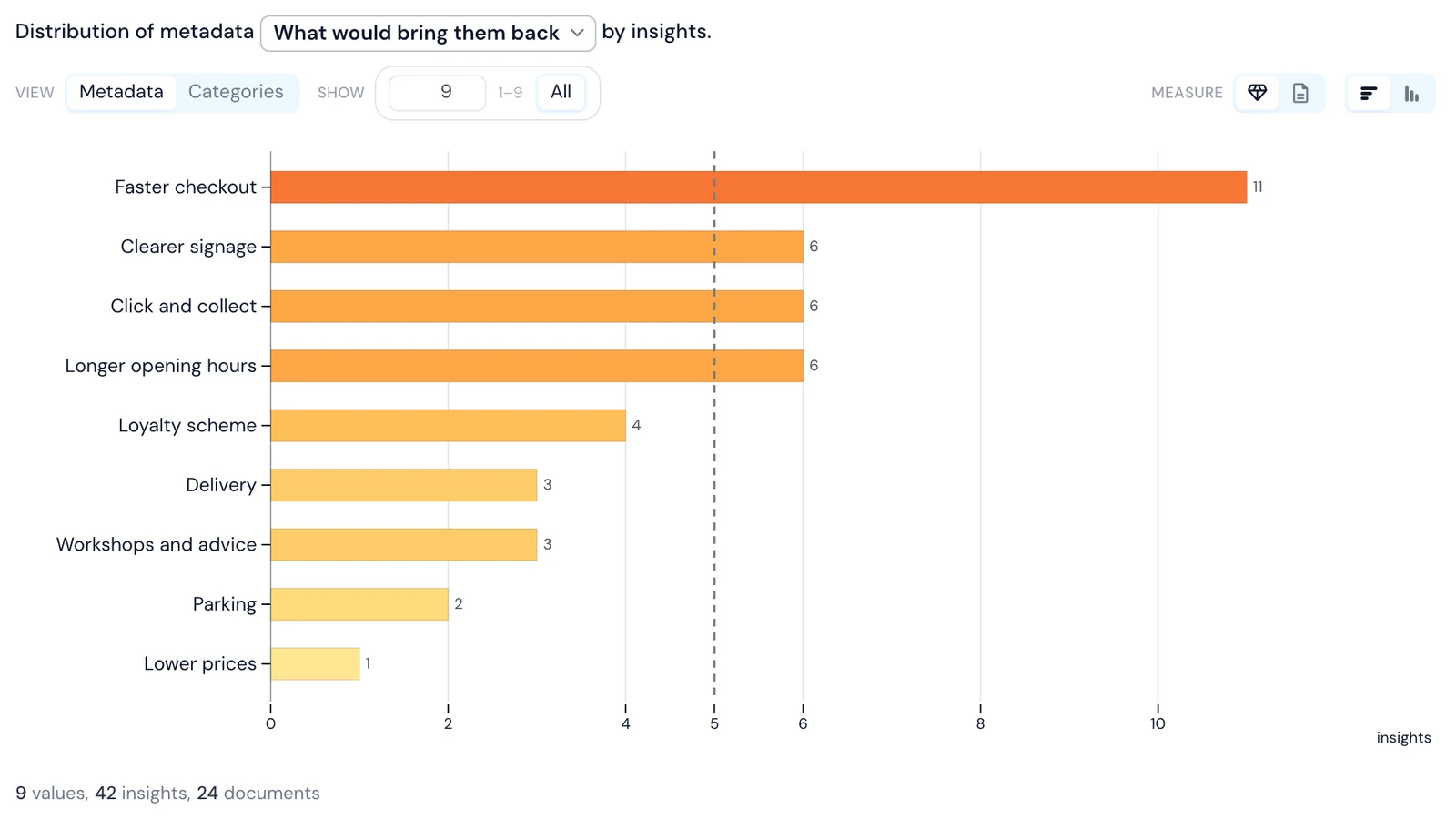
Once filled, an open question behaves like a closed one. The chart below counts insights by the value of the new field: a faster checkout leads, and clearer signage, click and collect and longer opening hours follow.
The leaving field produced the most striking number: 7 of the 9 weekly shoppers said they had left without buying or seriously considered it, against none of the other 15. Nobody was asked that question. It came out of what people said about the queue. With 24 respondents that is a direction, not a measurement: before acting on a split like this in a real study you would want at least a few dozen people in each group, and our guide on how many AI-moderated interviews you need covers the sizing.
Treat AI-filled values like any coded data and spot-check them. In our run one shopper who said they drive to the retail park when it rains (because they cannot park) was filled as "left without buying". That reading is defensible, but it is not what the field meant, so we recoded it to "no". Every value links back to the conversation, so a check takes seconds. See two-way transparency for why that traceability matters.
Step 5: compare groups and read why
With closed answers and coded themes in the same project, you can cut one by the other. The heatmap below lays the themes against visit frequency. Eight of the nine insights about checkout waits come from weekly shoppers, and the first-time visitors talk about signage and finding things instead.
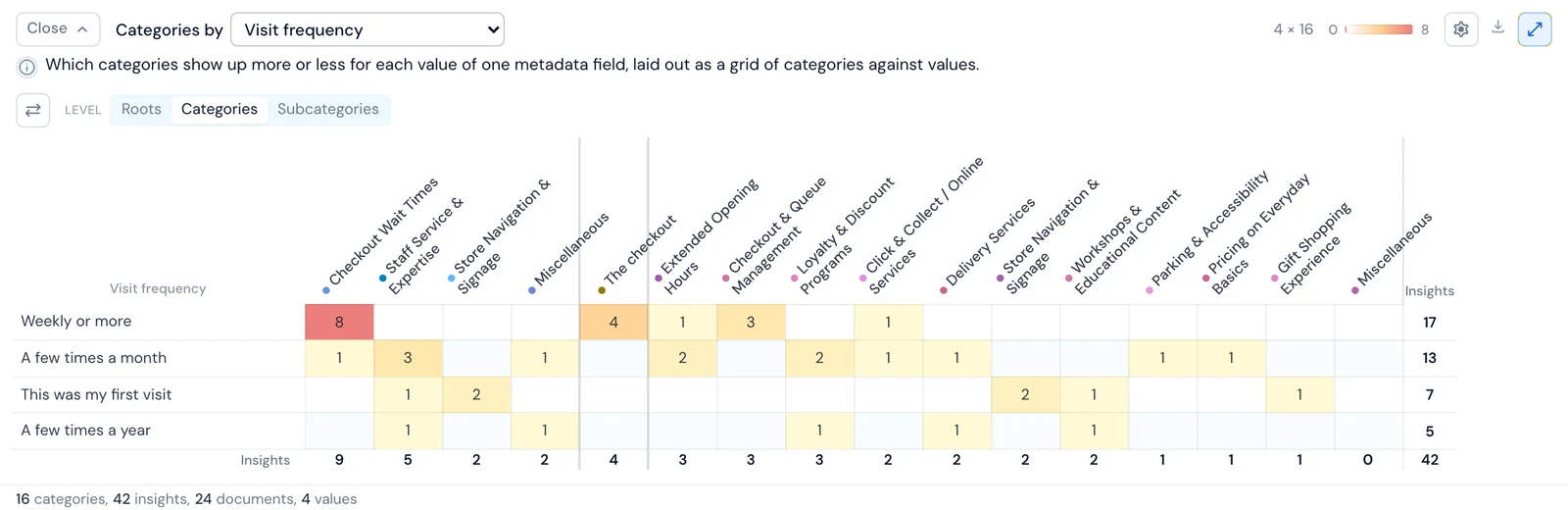
Clicking any cell opens the quotes behind it. The guide to metadata variables walks through the comparison and heatmap views on a larger dataset, and the visualisations docs cover every chart.
For Harbour Street, the result fits on one slide: weekly shoppers are the least satisfied group because of a Saturday checkout bottleneck, most of them have nearly walked out over it, some already buy compost elsewhere, and the fix they ask for is a second till between ten and one. Each of those claims has a number and a quote behind it.
What else can Skimle Ask do?
Beyond answer types, branching and sharing, the features that matter most for running Ask at scale:
- 29 interview languages. Tick the languages respondents may answer in, and questions, options and messages are translated automatically when you save. Respondents see the interview in their browser's language if you offer it. Answers come back in the respondent's language and are analysed together in one project, with quotes kept in the original.
- Voice and video answers. Respondents can type, dictate or record. For the whole interview you can switch voice or video recording off, suggest it or require it, and recordings are transcribed and playable next to the transcript.
- A face behind the interview. The welcome card shows who is asking, with a name, a role and an optional photo, such as "Maija, store manager" in our example, and a privacy notice respondents can open.
- Anonymous or identified. Interviews are anonymous by default; you can ask for an email address at the start, use personal links from "Email invitations", and write the privacy notice respondents see.
- Your own ending. On a paid plan the completion message is yours, in every language of the interview, with up to two buttons pointing people somewhere next and no Skimle invitation.
- Import and export guides. Import an existing interview guide from Word, PDF, Excel or a text file and Skimle turns it into questions, or export yours as a Word document to share with colleagues.
- Preview before sending. A preview opens a fresh run of the interview that saves nothing unless you switch "Save answers" on, so you can test branches and follow-ups yourself on desktop or phone.
- Free to run. Skimle Ask is included in all plans, including the free one; only the analysis of the answers uses credits.
How do you launch your first Skimle Ask in 6 steps?
- Decide the one thing you need to know. "What would make customers visit more often?" works better than a list of topics. A five-minute interview has room for one or two real questions.
- Describe it in a sentence. Skimle drafts a guide with open and closed questions, or start from a ready-made guide. Reword anything that does not sound like you.
- Use closed questions for the segments and scores you will want to cut by. Visit frequency, a star rating, an NPS score, customer type. Keep them to a handful; each one is a column later. If you run the interview in waves, keep the closed questions word for word the same so the columns can be tracked over time.
- Put AI follow-ups where the reasons are. Under the overall rating and under your main open question, with instructions on what to probe for. Leave follow-ups off questions you only included for completeness.
- Add a branch where only some people should be asked. Low checkout score goes to the checkout question; everyone else skips it.
- Preview, then share. Run the preview yourself, set the target length, write a two-line intro saying who is asking and why, and share it where your people already are: a QR code on the receipt, personal links in an email, the first question in your newsletter or an embed on your website.
For more on writing questions that produce good answers, see our guide on how to write a good interview guide and on open-ended questions.
When should you use Skimle Ask?
- Customer experience and satisfaction studies where you need both a score and its reasons
- NPS or CSAT programmes that keep producing a number nobody can explain (see how to analyse NPS verbatims)
- Checking how a team feels about a proposal, a reorganisation or a return-to-office plan
- A first pass on a research question before deciding whether it deserves full depth interviews
- Continuous feedback across the customer lifecycle, as in always-on customer research
Frequently asked questions
What does "qual at scale" mean?
Qual at scale means collecting qualitative, open-ended answers from far more people than interviews normally reach, typically hundreds or thousands, by having an AI conduct short structured conversations. The trade-off is depth per person: a five-minute AI interview goes deeper than a survey text box but not as deep as a 45-minute conversation with a skilled researcher.
Can Skimle Ask combine rating scales with open questions?
Yes. Skimle Ask has 13 answer types, including star ratings, face ratings, net promoter scores, sliders, rating grids, rankings and best-and-worst, alongside open, recorded and uploaded answers. Any closed question can have an AI follow-up that asks why the respondent chose that answer, and closed answers can branch the interview to different questions.
Can I embed a Skimle Ask survey on my website or in a newsletter?
Yes. You can embed the whole interview on a web page, or just its first question styled to match your page, and you can paste the first question into an email or newsletter so readers answer with one click. The interview then opens with that answer already given.
Does Skimle send the invitation emails?
No. "Email invitations" creates a personal link for each person, and you send the invitations from your own mail tool using a mail merge in Gmail, Outlook, Mailchimp or similar. Each answer then arrives with the person's name and the details you uploaded about them.
How do you get quantitative data from qualitative interview replies?
Closed answers in Skimle Ask become metadata columns automatically when responses are confirmed. For open answers, you add a metadata field with allowed values and instructions, and Skimle fills it by reading each conversation, so "what would bring you back" becomes a countable variable. Every value links back to the conversation it came from.
Is Skimle Ask the same as Anthropic Interviewer?
No. Both are built on the same idea, an AI conducting an adaptive conversation instead of a static form, but Anthropic Interviewer is Anthropic's research tool for studying how people use Claude. Skimle Ask is a product anyone can use for any topic, with the analysis built into the same project.
How long does a Skimle Ask interview take to set up and answer?
Drafting and editing a guide like the nine-question example here takes 10 to 20 minutes. Respondents typically spend 3 to 10 minutes, depending on the target length you set and how many follow-ups you allow.
Is it free to try?
Yes. Skimle Ask is included in every plan, including the free one, so creating and sending an interview costs nothing; only the analysis of the answers uses credits, and Skimle's free plan covers smaller projects.
Ready to find out why your customers score you the way they do? Try Skimle Ask for free and get your first answers back, already organised into themes and columns, within the hour.
Want to go deeper? Read how Skimle Ask was introduced and how it works end to end, how many AI-moderated interviews you need, and how to analyse open-text responses at scale.
About the authors
Henri Schildt is a Professor of Strategy at Aalto University School of Business and co-founder of Skimle. He has published over a dozen peer-reviewed articles using qualitative methods, including work in Academy of Management Journal, Organisation Science, and Strategic Management Journal. Google Scholar profile
Olli Salo is a co-founder at Skimle and former Partner at McKinsey & Company where he spent 18 years helping clients understand their markets, develop winning strategies and improve their operating models. He has done over 1000 client interviews and published over 10 articles on McKinsey.com and beyond. LinkedIn profile
Sources
- Galesic, M. and Bosnjak, M. (2009). Effects of questionnaire length on participation and indicators of response quality in a web survey. Public Opinion Quarterly, 73(2), 349-360
- Xiao, Z. et al. (2020). Tell me about yourself: using an AI-powered chatbot to conduct conversational surveys with open-ended questions. ACM Transactions on Computer-Human Interaction
- Introducing Anthropic Interviewer: what 1,250 professionals told us about working with AI - Anthropic
- What 81,000 people want from AI - Anthropic