Qualitative analysis for curious professionals

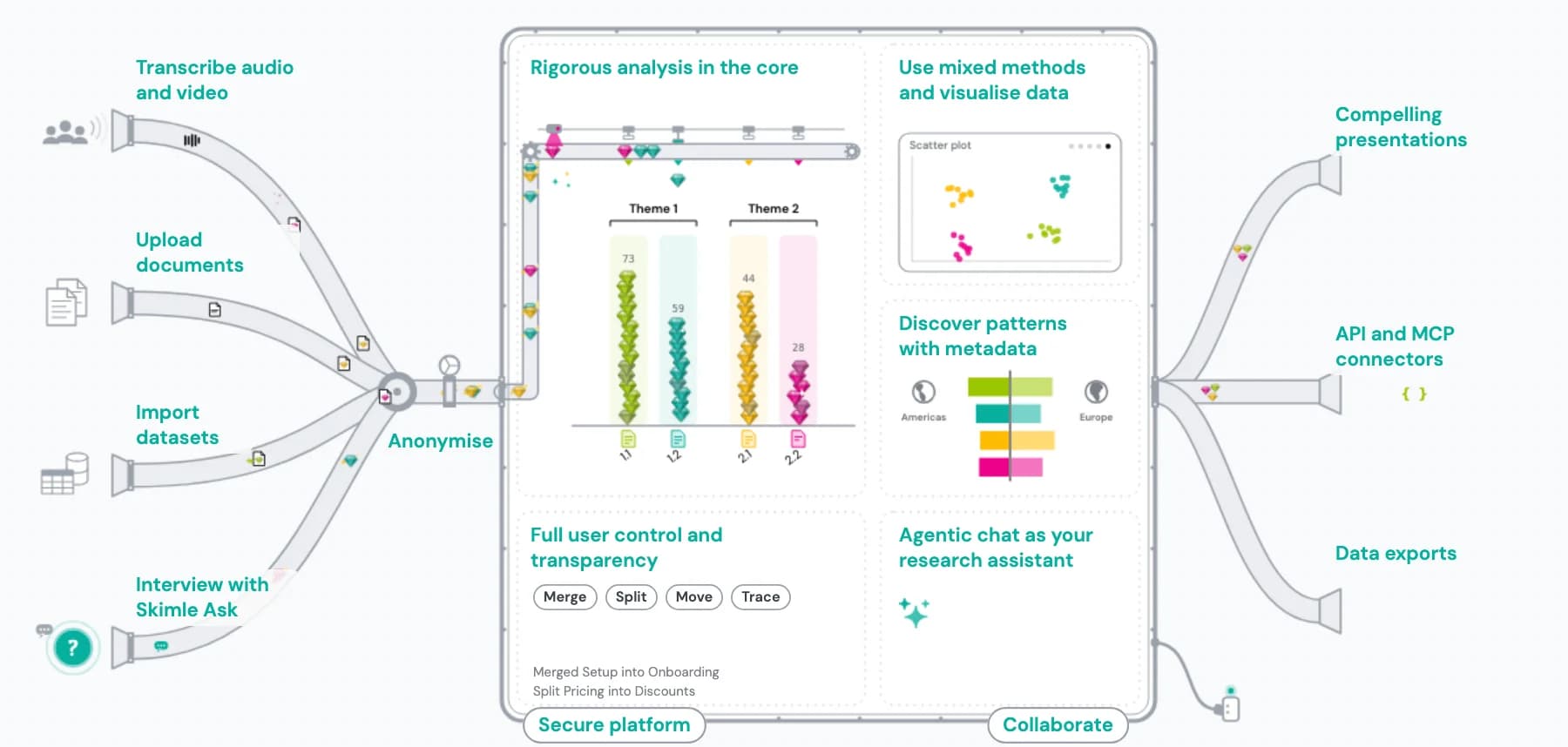
Rigorous qualitative analysis in the core
Bottom-up, proven analysis workflow distilling 40+ years of academic and applied qualitative analysis experience.
Versatile workspace
Mix and match any qualitative data (audio, video, text, …), anonymise, visualise using mixed methods, create presentations, and share with humans and AI.
Two-way transparency and control
Every code, category and summary is editable and traceable to the source text, so the human expert can apply their judgement.

Skimle is used by experts across industries


Skimle Ask
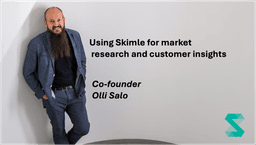
Until now, researchers often faced the choice between the scale of quantitative research versus the richness of insights from qualitative research. Skimle Ask changes the equation: you can set up our AI-assisted interviewer to conduct interviews at scale, and then analyse the responses to spot emerging themes.
Simply describe your research objective and our AI will draft the interview guide for you to finalise. Share the interview link and allow respondents to chat with Skimle Ask's intuitive and smart AI interviewer at a time of their choosing. Find insights and discover themes instantly with Skimle's sophisticated AI analysis.
Try it out: Create your own Skimle Ask in seconds
Try it out: Answer a live Skimle Ask demo
Your benefits with Skimle

Rigorous qualitative analysis at the core
Skimle automatically collects, codes and categorises interview transcripts, survey responses, reports and other qualitative data across hundreds of documents. The workflow mirrors established qualitative data analysis methods, from thematic analysis to inductive and deductive coding, distilled from over 40 years of academic and business research. You get systematic, defensible coding at scale rather than a shallow AI summary.
Versatile workspace for collaboration and integration
Start wherever your data lives: audio and video, transcripts, documents, open-text answers, or AI-led Skimle Ask interviews. Transcribe and anonymise in place, combine sources in a single project, and explore patterns with mixed-method tools and metadata segmentation. Collaborate with colleagues and AI agents in a shared workspace, then export to Word, PowerPoint, Excel, or REFI-QDA for NVivo and MAXQDA.
Full two-way transparency and control
Every code, category and summary is editable and traceable down to the source text, and each quote is mechanically checked to be 100% verbatim. Findings stay auditable and defensible, your analysis stays reflexive, and you keep control instead of trusting a black box. You set the framing; the AI does the systematic first pass.


Full set of features
Explore the core 15 Skimle features in depth →Upload and collect data
Bring together data across sources
Skimle can analyse interview transcripts, audio, video, open text answers, customer calls and chat logs, articles, books, websites, data room contents, discovery material, patents, reports, contracts, and more... all in one combined project
1000+ documents in 100+ languages
Skimle supports large sets of qualitative data. Source documents can be in different languages making working in multi-lingual setups easy.
Everything is securely stored in the EU
Skimle is fully GDPR and EU AI Act compliant with the data stored in the cloud. We provide a Data Processing Agreement and offer single tenancy cloud options for businesses.
Smart AI interviewer: Skimle Ask
Write an interview guide together with our AI assistant, share the link and let participants be interviewed with our smart AI assistant knowing when to dig deeper and when to press on. Analyse responses with Skimle's core analysis tools.
High-quality transcription with multi-speaker support
Upload audio or video files and get accurate AI transcriptions with automatic speaker identification and labelling. Supports 100+ languages — transcripts feed directly into Skimle's analysis workflow.
Automated AI analysis of themes
Skimle offer analyses with your preferred level of control. AI can suggest a structure, based on your interview questions, document headings, and an inductive analysis of your contents. Skimle forms subcategories automatically, but gives you control to adapt them as needed.
Anonymise your documents
Skimle Anonymise pseudonymises and de-identifies your transcripts before you share them or analyse them. Three compliance levels from light pseudonymisation to HIPAA-grade anonymisation — with a full audit report included for compliance.
- ✓Import text from .pdf, .docx, .txt, .rtf, .csv, websites, and more
- ✓Import video and audio for high-quality AI transcription with multi-speaker support
- ✓100+ languages supported for multilingual analysis
- ✓Handle 1,000+ documents per project
- ✓Automatic AI-generated metadata fields for sorting, filtering and analysis
- ✓AI-created metadata: instruct Skimle to tag each document (e.g., "Is this a complaint, yes/no")
- ✓Automated suggestions for inductive and thematic analysis
- ✓Full control on categories and knowledge to extract
- ✓Background processing of large datasets with email notifications
- ✓Manage and share projects with your team
- ✓Anonymise transcripts: three compliance levels — light pseudonymisation, strong pseudonymisation, HIPAA-grade anonymisation
- ✓AI detects identifiers across six categories: names, titles and roles, locations, organisations, dates, and other
- ✓Cross-file consistency: same pseudonym for the same person across all documents
- ✓PDF audit report and Excel translation table included
Show all 14 features ▾
- ✓Import text from .pdf, .docx, .txt, .rtf, .csv, websites, and more
- ✓Import video and audio for high-quality AI transcription with multi-speaker support
- ✓100+ languages supported for multilingual analysis
- ✓Handle 1,000+ documents per project
- ✓Automatic AI-generated metadata fields for sorting, filtering and analysis
- ✓AI-created metadata: instruct Skimle to tag each document (e.g., "Is this a complaint, yes/no")
- ✓Automated suggestions for inductive and thematic analysis
- ✓Full control on categories and knowledge to extract
- ✓Background processing of large datasets with email notifications
- ✓Manage and share projects with your team
- ✓Anonymise transcripts: three compliance levels — light pseudonymisation, strong pseudonymisation, HIPAA-grade anonymisation
- ✓AI detects identifiers across six categories: names, titles and roles, locations, organisations, dates, and other
- ✓Cross-file consistency: same pseudonym for the same person across all documents
- ✓PDF audit report and Excel translation table included
Analyse and explore your data
Social science methodology - on steroids
Automatic generation of categories based on analysing each document and creating a joint taxonomy. The workflow follows the same rigorous approach as reflexive thematic analysis in the tradition of Braun and Clarke, but automates it with thousands of atomic LLM micro-queries.
Agentic analysis: from research question to written answer
Start from a research question and let Skimle build a codebook, code every document, and synthesise analytical themes with counter-evidence and citations. Agentic analysis turns a question into a written, evidence-backed answer, not just a category tree.
Intuitive and transparent document × category table
Clear table view to examine insights in each document (e.g., interview) connected to meaningful categories (e.g., risks). Verified verbatim quotes for each theme, with full control on categories and coding of data. No black boxes, no hallucinations.
You are in full control of the analysis
Define your own viewpoint and have Skimle extract and categorise insights for you, manually add or remove insights, and then use our powerful user interface to easily reorganise your results.
Smart AI chat to assist with analysis
Custom reasoning model with awareness of your metadata and categories allows you to ask questions like "How do men and women differ in their answers?" or "What are the points of disagreement in this theme?" to gain deeper insights.
Visualisations: metadata analysis and pattern detection
Skimle automatically assigns metadata to each document (sentiment, time period, and more) and lets you create your own AI-generated fields. Visualise heatmaps of topics by document type in Visualisations, and let Skimle automatically surface which metadata variables best explain differences in the data — for example, how answers differ between customer segments or time periods.
- ✓Paragraph-by-paragraph analysis ensures systematic, comprehensive coverage of every document
- ✓Two-way transparency: trace from summary to quote to source document and back
- ✓Highlights in source documents show exactly how AI analysed each passage
- ✓Category view with summaries across different levels of abstraction
- ✓User-controlled editing: accept, modify or reject any AI suggestion
- ✓Rename, merge or split categories as your understanding evolves
- ✓Automatic metadata assignment (sentiment, time period, custom fields)
- ✓Filter and cross-tabulate by demographics, date, source type or custom metadata
- ✓Heatmap view to see which topics feature in which document segments
- ✓Word clouds, frequency charts and trends over time
- ✓AI auto-detects which metadata variables best explain differences in the data
- ✓Group comparisons that explain what separates segments, with every metadata split ranked by effect size
- ✓AI chat with reasoning capabilities — ask cross-category and metadata questions
- ✓Agentic analysis: research-question-driven coding with analytical themes, counter-evidence and citations
- ✓Supports thematic analysis, grounded theory, content analysis and qualitative market research workflows
- ✓Zero hallucinations: every insight linked to a verified, verbatim quote
Show all 16 features ▾
- ✓Paragraph-by-paragraph analysis ensures systematic, comprehensive coverage of every document
- ✓Two-way transparency: trace from summary to quote to source document and back
- ✓Highlights in source documents show exactly how AI analysed each passage
- ✓Category view with summaries across different levels of abstraction
- ✓User-controlled editing: accept, modify or reject any AI suggestion
- ✓Rename, merge or split categories as your understanding evolves
- ✓Automatic metadata assignment (sentiment, time period, custom fields)
- ✓Filter and cross-tabulate by demographics, date, source type or custom metadata
- ✓Heatmap view to see which topics feature in which document segments
- ✓Word clouds, frequency charts and trends over time
- ✓AI auto-detects which metadata variables best explain differences in the data
- ✓Group comparisons that explain what separates segments, with every metadata split ranked by effect size
- ✓AI chat with reasoning capabilities — ask cross-category and metadata questions
- ✓Agentic analysis: research-question-driven coding with analytical themes, counter-evidence and citations
- ✓Supports thematic analysis, grounded theory, content analysis and qualitative market research workflows
- ✓Zero hallucinations: every insight linked to a verified, verbatim quote
Export and integrate
Customisable reports in Word, Excel, and PowerPoint format
Instantly turn your insights into focused reports in formats making communication and storytelling of the results easy. Reports developed together with users to fit each domain.
Export REFI-QDA files to NVivo, MAXQDA, ATLAS.ti and more
You can export the AI-coded documents into an open source format supported by most CAQDAS (computer-assisted qualitative data analysis software) tools, including NVivo, MAXQDA and ATLAS.ti. Coding, category summaries and codebooks exported.
MCP access for agents
Give your Claude Code, Cowork or other agent tools the superpower of analysing and structuring qualitative data with Skimle. Full upload, edit and download skills available via MCP server.
Evaluate documents against criteria — coming soon
Go beyond descriptive analysis to systematic evaluation. Specify scoring criteria by category — for example, assess tender responses on technical capability, cost structure, and risk management. Skimle highlights strengths and gaps in each document and exports structured scoring matrices for decision support.
- ✓Word report with overall and by-category summaries and selected quotes
- ✓PowerPoint report with executive summary and deepdives by theme with relevant quotes
- ✓Excel export of categories, comments and structured data
- ✓REFI-QDA export for use in NVivo, ATLAS.ti, MAXQDA and other legacy QDA tools
- ✓Category view with expandable branches for interactive data exploration
- ✓Every report item links back to verbatim source quotes
- ✓Evaluate documents against scoring criteria with exportable matrices — coming soon
- ✓System integration via REST API and MCP for automated workflows
- ✓Enterprise: single-tenancy cloud, own database, admin controls and SSO
- ✓MCP access for agents like Claude Code, Cowork and OpenClaw for custom integrations
Show all 10 features ▾
- ✓Word report with overall and by-category summaries and selected quotes
- ✓PowerPoint report with executive summary and deepdives by theme with relevant quotes
- ✓Excel export of categories, comments and structured data
- ✓REFI-QDA export for use in NVivo, ATLAS.ti, MAXQDA and other legacy QDA tools
- ✓Category view with expandable branches for interactive data exploration
- ✓Every report item links back to verbatim source quotes
- ✓Evaluate documents against scoring criteria with exportable matrices — coming soon
- ✓System integration via REST API and MCP for automated workflows
- ✓Enterprise: single-tenancy cloud, own database, admin controls and SSO
- ✓MCP access for agents like Claude Code, Cowork and OpenClaw for custom integrations