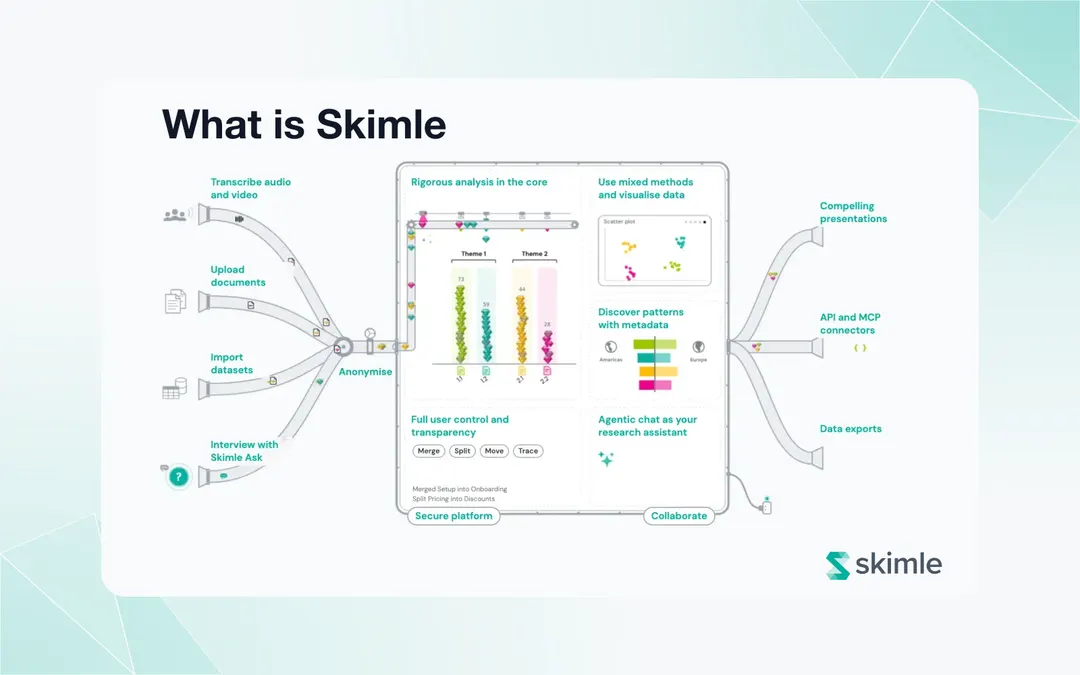
Qualitative research has always been siloed. You analyse in one tool, write your report in another, build your presentation in a third. Each handoff is an opportunity for context to be lost, for nuance to be flattened, for that critical insight from interview twelve to get buried under the weight of everything else. For decades, this was simply an accepted cost of doing thorough research.
Today, we are changing that. Skimle now supports the Model Context Protocol (MCP), a standard that lets external AI tools read and write your structured qualitative project data directly. If you use Claude Desktop, Cursor, Windsurf, or any MCP-compatible tool, you can now query your Skimle projects from inside those environments. Your categories, insights, memos, and documents are no longer locked inside a single interface.
What is the Model Context Protocol?
MCP is an open protocol developed by Anthropic and released to the community in late 2024. It defines a standard way for AI tools to connect to external data sources and services. Rather than copying and pasting content into a chat window, an AI tool supporting MCP can retrieve structured data from authorised services at query time, take actions, and write back results.
MCP lets an AI agent access your data from a connected service without you having to manually transfer anything. The protocol covers both reading data and performing write operations, and it handles authentication cleanly.
The result is that your AI tool of choice can talk to Skimle as if it were a native part of that tool. Ask Claude Desktop what your top five insight categories are in a given project, and it retrieves the answer directly from your Skimle data. Ask it to merge two overlapping categories, and it writes that change back. No copy-pasting, no context switching.
One agentic interface, two ways in
When we designed MCP support for Skimle, we made a deliberate architectural decision: the MCP endpoint and the in-app Agentic Chat are the same interface, powered by the same tools, accessing the same structured data. And the structured data is the same all human users share. This enables seamless collaboration around one source of truth across a full team of humans and agents.
If you work primarily inside Skimle, the Agentic Chat tab in your project gives you access to the full set of tools. You ask questions, explore your data, reorganise categories, create notes, all without leaving the application.
If you work in Claude Desktop, Cursor, Windsurf, or another MCP-compatible environment, you connect the tools once using our straightforward Skimle MCP guide, and get identical access. The tools behave identically. The data is identical. The only difference is where you are sitting when you use it.
This means Skimle MCP is not an add-on or an integration layer bolted on afterwards. It is the same analytical engine, made accessible from wherever you happen to work.
Why structured data matters here
There is a tempting shortcut that many teams take when they want AI to help with qualitative research: they paste their raw transcripts into a general-purpose chat window and ask questions. This works, up to a point, but it has serious limitations that become apparent as soon as the work gets serious.
The core problem is that when you give an AI tool a pile of unstructured text, it has to reconstruct the meaning, relationships, and categories from scratch every single time. It cannot remember what you decided last session. It cannot tell you whether its thematic list is comprehensive. It cannot trace a claim back to a specific quote with certainty.
Skimle's structured data model changes what an AI agent can reliably do. By the time you open an Agentic Chat session or connect via MCP, your project data already contains:
- Insights: discrete, quotable findings extracted from each document, with source attribution back to the original passage
- Categories: a structured taxonomy your analysis has built, with hierarchy, descriptions, and membership lists
- Documents: the original sources, each with extracted metadata and linked insights
- Memos: your analytical notes, reflections, and intermediate conclusions
- Metadata variables: segment labels attached to each document (interviewee role, geography, interview date, and so on)
- Tags: cross-cutting labels you apply to organise material across category lines
When an agent queries this data, it is not guessing at themes. It is navigating a structure you have built. It can retrieve all insights in a category, compare insight counts across metadata groups, find insights that have been tagged but not yet categorised, or check whether a particular theme appears in only one segment of your participant pool. These are reliable, repeatable operations. They produce the same result every time, because the underlying structure is stable.
This is the qualitative equivalent of the difference between asking someone to summarise a meeting from memory versus handing them structured meeting notes with agenda items, action points, and attributed quotes.
What the MCP tools can do
Skimle's MCP connection gives your AI agent two types of capability: reading your project and writing back to it.
On the reading side, the agent can browse your documents, retrieve insights and the categories they sit in, search semantically across the entire corpus, pull up researcher memos and notes, and inspect the metadata structure you have set up. It can also read the full text of individual documents and identify named entities across your data. In practice this means you can ask questions like "what did enterprise customers say about onboarding?" or "find all insights tagged as blockers" and get structured, source-linked answers without touching the Skimle interface.
On the writing side, the agent can create, update and delete insights; restructure your category tree; assign insights to categories; manage tags; and save notes back to the project. This is what makes MCP genuinely agentic rather than just read-only: the agent can reorganise your analysis, not just report on it.
Together, these cover the full arc of a qualitative analysis session: exploring what is there, testing hypotheses, reorganising structure, and capturing observations as you go.
Use cases for academic researchers
For academic researchers, the most immediate value of MCP is the ability to query your Skimle project from inside the tools where you are already writing.
Consider a researcher drafting a journal article in a text editor with Claude integration. They reach the discussion section and want to check whether the tension they are describing between two theoretical categories is genuinely present in the data, or whether they are over-reading. Without MCP, they switch back to Skimle, search manually, pull quotes, switch back to the document. With MCP, they ask Claude to retrieve the insights from both categories and compare them. The answer comes back in seconds, with source citations included.
More structured analytical tasks become accessible too. The compare_metadata_groups prompt is particularly useful for hypothesis testing. If a researcher has labelled their interview participants by career stage or disciplinary background, they can ask the agent to compare how two groups talk about the same phenomenon. This is the kind of comparative work that used to require careful manual sorting; with structured metadata in place, it becomes a single query.
Skimle's MCP support is also well suited to the kind of extended analysis typical in grounded theory and inductive research. As categories emerge and shift over the course of a study, the agent can help track structural changes, flag categories that have grown too large to be analytically useful, and surface insights that were categorised early in the project under different assumptions.
For researchers working in teams, MCP provides a shared analytical layer. Multiple team members can connect external tools to the same Skimle project, query the same structured data, and write notes back to a shared repository without needing to coordinate file versions or summarise for each other by hand.
You can read more about Skimle's approach to academic research workflows here.
Use cases for consultants and investors
Commercial due diligence and strategy engagements generate dense volumes of qualitative data: expert network calls, client interviews, management presentations, data room documents. Keeping that material organised, and then being able to navigate it quickly while writing a report, is a persistent challenge.
With MCP, a consultant working in Claude Desktop can query their Skimle project directly from the report-writing environment. As they draft a section on competitive dynamics, they can ask the agent to retrieve all insights tagged with a particular competitor name, or compare what customers in different segments said about switching costs. The insights come back with source attribution, so they can verify a claim and pull the exact quote without switching applications.
The write tools are equally useful in this context. If a consultant realises mid-analysis that two of their categories are actually the same phenomenon described differently by different interviewees, they can merge them through Claude Desktop without returning to Skimle's interface. The reorganisation is reflected immediately in the structured data and in any subsequent queries.
For investors running commercial due diligence, the ability to compare metadata groups is particularly valuable. If interview subjects have been tagged by their role (customer, competitor, supplier, former employee), the compare_metadata_groups prompt can surface whether the story being told varies meaningfully by group. That is a question due diligence teams ask constantly; MCP makes it fast and auditable.
Use cases for market researchers
Market and customer researchers often work across two environments: a research tool for analysis and a presentation tool for output. Insights get translated into slides, sometimes losing precision in the process. The ability to query Skimle from inside a writing or presentation-preparation workflow reduces that translation cost.
A researcher building a competitive landscape presentation in a Claude-integrated environment can ask for the top five themes from a recent customer interview project, retrieve supporting quotes for each, and check whether a particular segment has an outlier view. All of this happens without leaving the presentation-drafting environment.
For ongoing research programmes, MCP supports a more cumulative approach. Rather than each research round being a fresh project with no connection to what came before, teams can build a persistent structured knowledge base in Skimle and query it continuously as new data comes in. The self-service model for qualitative insights becomes more practical when the data is accessible from wherever people work.
Available on all plans
MCP access is included on every Skimle plan. There is no separate tier or add-on. MCP queries consume credits at the same rate as equivalent operations in the Skimle interface, from the same credit pool. If you are already using Skimle, you have access to MCP today.
This decision reflects our view that access to your own structured research data from your own tools should not be a premium feature. MCP is infrastructure, not a differentiator.
Setting up
To connect an MCP-compatible tool to Skimle, follow this simple Skimle MCP guide.
Once connected, simply mention the Skimle skill to the agent and it will see your your project structure and available tools. Full setup documentation is on the MCP page.
For users who prefer to stay entirely within Skimle, the Chat tab in your project provides the same agentic experience without any configuration. Open the Chat tab, and you have access to all the same tools.
What comes next
MCP is the first step in a broader shift in how Skimle connects to the tools researchers and analysts use every day. We have built this as an open, standards-based integration, which means it will work with any tool that adopts MCP, including tools that do not exist yet.
The underlying insight that drives this is simple: qualitative research data should not be trapped in any single interface. The hardcore analytical heavylifting happens inside Skimle, which provides a single source of truth for the category structures and insights. The writing, the synthesis, the reporting, the iteration: those happen wherever the researcher happens to be working. MCP closes that gap.
If you are already a Skimle user, your MCP access is live. If you are new to Skimle, you can read more about what Skimle does and explore the pricing page.
About the authors
Henri Schildt is a Professor of Strategy at Aalto University School of Business and co-founder of Skimle. He has published over a dozen peer-reviewed articles using qualitative methods, including work in Academy of Management Journal, Organisation Science, and Strategic Management Journal. His research focuses on organisational strategy, innovation, and qualitative methodology. Google Scholar profile
Olli Salo is a former Partner at McKinsey & Company where he spent 18 years helping clients understand the markets and themselves, develop winning strategies and improve their operating models. He has done over 1000 client interviews and published over 10 articles on McKinsey.com and beyond. LinkedIn profile