To analyse interviews or other qualitative data using Skimle's Agentic Chat and MCP: (1) Upload and run initial initial analysis on your documents to build structured project data. (2) Open the Chat tab in your project to start an Agentic Chat session, or connect your AI tool to Skimle via MCP following the setup instructions. (3) Explore your data, categories and insights, run comparisons across metadata groups, and reorganise your category structure together with the agent. Tools like Skimle make it practical to run a full AI-assisted thematic analysis without losing source traceability or your own analytical judgement.
This guide covers two workflows in detail: in-app Agentic Chat for users who work within Skimle, and the MCP connection for users of Claude Desktop, Cursor, Windsurf, or any other MCP-compatible tool. Both give you access to the same structured project data and the same set of agent tools as well as the full collaboration options with other human and AI team members. For a tour of everything the in-app chat can do, with worked examples from a grounded theory study and a customer feedback project, see how to use Skimle's chat.
What you can do
Before diving into the how, here is a sense of what becomes possible once your project is structured and the agent is connected.
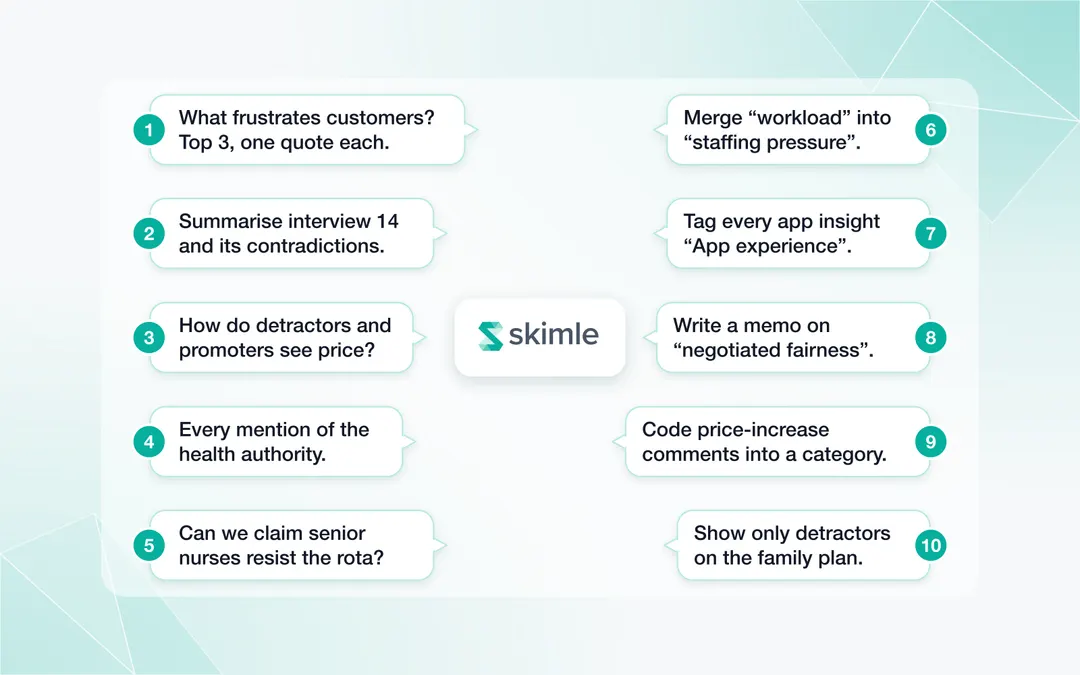
You can explore your data conversationally — ask things like "what are the five biggest themes in this project and which ones have internal disagreement?" and get a structured answer with source references, without clicking through categories manually.
You can compare across groups — "how do enterprise customers and SMB customers describe the onboarding experience differently?" The agent retrieves insights filtered by your metadata variables and summarises the differences.
You can find cross-cutting patterns — "find and tag all insights that mention pricing, regardless of which category they are in." This surfaces themes that cut across your category structure and might otherwise be invisible.
You can reorganise your analysis — "merge the 'compliance concerns' category into 'vendor evaluation' and rename it." The agent executes the restructuring and reassigns all the affected insights.
You can verify hypotheses before writing them up — "could we claim that enterprise customers rarely raise pricing concerns based on the data?" The agent checks the evidence and tells you how many insights back it up, across which segments and documents.
All of this happens through plain conversation. You do not need to learn any syntax or commands.
Part 1: Starting your project
Before you can benefit from Agentic Chat or MCP, you need to create a structured Skimle project. The agent's power comes from the structure already built into your data. Skipping this step and asking the agent to work from raw documents is like asking a research assistant to summarise filing cabinets without telling them the filing system.
Uploading your documents and running initial analysis
Start by creating a new project and uploading your source materials. Skimle supports interview transcripts, survey open-text exports, focus group transcripts, PDFs, Word documents, and plain text files. If you have audio or video files that have not yet been transcribed, Skimle can handle the transcription step. The transcription feature converts audio to text within the platform, so you do not need to use a separate service before uploading.
For a detailed walkthrough of the import and metadata setup process, see end-to-end workflows: importing and exporting data with Skimle.
Next, run the Skimle analysis. This is the step that transforms raw documents into structured data: the system extracts insights from each document, identifies emerging categories, builds the category hierarchy, and assigns insights to categories. You can either ask Skimle to automatically identify themes, or select your own angle for the analysis (e.g, "perceptions on competitors"). The analysis typically takes a few minutes for a project of 20 to 30 documents.
Reviewing and adjusting categories
When the analysis completes, review the categories that have emerged. Skimle's initial categorisation is a starting point, not a final structure. You should expect to rename categories to fit your analytical framing, merge categories that are treating the same phenomenon as two separate themes, split categories that have grown too broad, and promote or demote items in the hierarchy to reflect the conceptual weight you want to assign them.
This review step is important for agentic work specifically. The better the category structure going into your first Agentic Chat session, the more precise the agent's responses will be. An agent working with a category called "challenges" will return broad, mixed results. An agent working with a category called "procurement process friction" will return specific, actionable findings.
For guidance on the thematic analysis process that underpins this review, the complete guide to thematic analysis is a useful reference. For interview-specific analysis steps, see how to analyse interview transcripts. The discovering themes using metadata variables guide covers how metadata-based comparison works and how to set up your variables effectively before analysis.
Part 2: Using Agentic Chat in-app
Once your project has a good category structure, you are ready to use Agentic Chat.
Opening the Chat tab
In any Skimle project, navigate to the Chat tab. This opens a conversation interface with a session context scoped to your project. The agent has access to all the structured data in the project: categories, insights, documents, memos, metadata, and tags.
You do not need to provide any system prompt or context-setting instruction. The agent knows which project it is connected to and can navigate the data structure directly.
Example prompts to start with
The first session is usually most valuable for orientation and exploration. Good starting prompts include:
Category overview. "Give me an overview of the top eight categories in this project, with insight counts and a one-sentence description of each." This gives you a quick read on whether the category tree reflects your analytical intentions.
Conflict and tension. "Which categories have the most internal tension? Look for categories where insights contradict each other or where the same phenomenon is described very differently by different participants." This prompt asks the agent to retrieve insights and reason about them, surfacing analytical questions you may not have spotted yet.
Metadata comparison. "Compare how enterprise and startup participants talk about pricing. Retrieve insights from both segments and summarise the differences." If you have a metadata variable for segment, this uses it to run a structured comparison.
Completeness check. "Are there any documents that have very few insights compared to others of similar length? List the documents with the lowest insight density." This helps you identify documents that may have been under-processed or that contain material you should revisit.
Sparse categories. "Which categories have fewer than five insights? For each, tell me whether it looks like an emerging theme worth developing or a miscategorisation that should be merged elsewhere." This combines retrieval with reasoning, and the agent's suggestions can inform your next round of reorganisation.
Merging categories via chat
When the agent identifies potential overlaps, or when you decide independently that two categories should be merged, you can instruct the agent to perform the merge directly.
Example: "Merge the 'approval processes' category into the 'procurement friction' category. Keep the combined category under the name 'procurement friction' and make sure all insights from both categories are assigned to it."
The agent will update the category and reassign insights. You can ask it to confirm the operation before executing, or to report back on how many insights were moved.
After a merge, ask the agent to retrieve the newly combined category's insights and summarise them. This is a good check that the merged category makes analytical sense and that the name still fits the full set of evidence.
Creating a note to capture reflections
Agentic Chat supports the creation of structured notes and memos that are saved to the project. This is useful for capturing analytical decisions, working hypotheses, and reflections that you want to preserve for later reference or for sharing with collaborators.
Example: "Create a note summarising the main findings on procurement friction. Include the three most representative insights, the range of participant views, and any notable segment differences."
The agent saves the memo to your project. You can review and edit it in the Notes view. This is particularly useful for building an audit trail of analytical decisions over the life of a project.
Part 3: Connecting via MCP
For users who work primarily in Claude Desktop, Cursor, Windsurf, or another MCP-compatible environment, you can access Skimle's agent tools directly from those applications. The connection exposes the same tools and the same structured data as in-app Agentic Chat.
Adding the MCP server and authenticating
Full step-by-step setup instructions are on the MCP page. The short version: you create an API key in Skimle under Home → Settings and Profile → External Access, then add Skimle as a connector in your AI tool using the URL https://skimle.com/api/mcp.
Starting a session
Once connected, open a new conversation in your AI tool and ask it to list your Skimle projects and what it can do with them. The agent will discover your available projects and explain the tools at its disposal. From there you work exactly as you would in in-app Agentic Chat.
What you can ask the agent to do via MCP
The read and write capabilities are identical to in-app Agentic Chat. You can ask the agent to browse your categories and insights, search semantically across your corpus, compare findings across metadata groups, and read full document content. On the write side, the agent can create and update categories, reassign insights, manage tags, and save notes back to your project.
The changes are reflected immediately in your Skimle project, so you can switch between working in your AI tool and reviewing the results in the Skimle interface at any point.
Part 4: A full example use case
The following example illustrates a complete agentic workflow for a thematic analysis project. It is based on a realistic scenario: 25 customer interviews for a B2B software company, conducted to understand friction in the purchasing process.
Setting the scene
The researcher has uploaded 25 interview transcripts. Participants are tagged with two metadata variables: "company size" (enterprise, mid-market, SMB) and "deal outcome" (closed-won, closed-lost, stalled). Skimle has run the initial analysis and produced a category tree with 16 categories and approximately 400 insights. The researcher has done a first-pass review of the top-level categories and made minor adjustments.
They are now ready to use Agentic Chat for the deeper analytical work.
Step 1: Understand the landscape
Opening the Chat tab, the researcher asks for an overview of the project. The agent returns: 16 categories, with the three largest being "procurement complexity" (58 insights), "product evaluation criteria" (47 insights), and "stakeholder alignment" (42 insights). Metadata coverage is complete: all 25 documents have both metadata variables assigned.
The agent notes that "procurement complexity" and "stakeholder alignment" have the highest proportion of insights flagged with tension markers. It suggests these categories may be worth examining for internal disagreement.
Step 2: Explore the top themes
The researcher asks: "For the three largest categories, give me a summary of the main sub-themes and tell me if there are any enterprise vs. SMB differences."
The agent retrieves the categories and insights, filtering by the "company size" metadata variable. It returns: in "procurement complexity", enterprise participants consistently mention legal review and security questionnaires as friction points; SMB participants more often mention budget approval cycles. In "stakeholder alignment", enterprise participants describe multi-department sign-off as the main obstacle; SMB participants focus on founder availability.
The researcher notes this for the report: the friction is real in both groups, but its texture is different.
Step 3: Spot overlapping categories
The researcher has noticed that the category tree includes both "vendor evaluation criteria" and "product evaluation criteria". They ask: "Do these two categories overlap? Show me examples of insights from each and tell me whether you think they are describing the same phenomenon."
The agent retrieves a sample from each category. The comparison shows that "vendor evaluation criteria" mostly contains insights about company stability, support quality, and security posture, while "product evaluation criteria" covers feature requirements and usability. The categories are genuinely distinct. The researcher keeps both.
However, the agent also flags that a third category, "risk and compliance", has significant overlap with parts of "vendor evaluation criteria", specifically around security and data handling. The researcher asks for a side-by-side comparison of the overlapping insights, reviews them, and decides to merge "risk and compliance" into "vendor evaluation criteria", renaming the combined category "vendor and compliance evaluation".
The merge is done in a single instruction: "Merge 'risk and compliance' into 'vendor evaluation criteria' and rename the result 'vendor and compliance evaluation'."
Step 4: Compare deal outcomes
The researcher now wants to test a hypothesis: that stalled deals have more friction in "stakeholder alignment" than won deals. They ask:
"Compare insights on stakeholder alignment between closed-won deals and stalled deals. I want to know whether the nature of stakeholder challenges is different."
The agent returns a structured comparison. In closed-won deals, stakeholder challenges tend to be described as resolved through product demonstrations and reference calls. In stalled deals, the stakeholder challenge is almost always framed as structural: multiple decision-makers with different priorities and no clear owner. This is a finding with direct implications for the company's sales motion.
Step 5: Search for a cross-cutting theme
The researcher wants to check whether "pricing" appears as a theme across categories, not just in the category explicitly about pricing. They ask: "Search for all insights that mention pricing, cost, budget, or commercial terms, regardless of which category they are in."
The agent returns 34 insights across seven categories. Pricing language appears most frequently in "procurement complexity" (12 insights) and "product evaluation criteria" (8 insights), but it also appears in "stakeholder alignment" (6 insights), where budget authority emerges as a stakeholder coordination issue. This is a structural insight the category tree alone would not have surfaced.
Step 6: Write up
The researcher drafts the concluding memo:
"Create a note summarising the four main findings from this project, with a one-paragraph narrative for each. Include the metadata comparison on deal outcomes in the stakeholder alignment section. Note the methodological decision to merge 'risk and compliance' into 'vendor and compliance evaluation' and the rationale."
The agent creates the note. The researcher reviews it, makes two edits, and saves it to the project. The note becomes the basis for the executive summary in the final report.
What this illustrates
The entire session took less than an hour. The researcher made all the substantive analytical decisions: what to compare, which categories to merge, what the findings mean, how to frame the summary. The agent handled retrieval, comparison, and execution. Every claim in the final memo is traceable back to specific insights, which trace back to specific quotes in specific transcripts.
This is what thematic analysis with agentic support looks like when the underlying data is properly structured. For a comparison of how this approach compares to other qualitative analysis tools, see qualitative data analysis tools: complete comparison.
Getting started
Both Agentic Chat and MCP are available on all Skimle plans, on the same credit pool as all other operations. You do not need to activate anything or upgrade.
To start with Agentic Chat: open any project with a completed analysis and click the Chat tab.
To start with MCP: visit the MCP setup page for configuration instructions for your specific tool. Authentication via OAuth takes two to three minutes.
If you are new to Skimle, the features overview explains how the platform works, and the pricing page covers what is included in each plan.
About the authors
Henri Schildt is a Professor of Strategy at Aalto University School of Business and co-founder of Skimle. He has published over a dozen peer-reviewed articles using qualitative methods, including work in Academy of Management Journal, Organisation Science, and Strategic Management Journal. His research focuses on organisational strategy, innovation, and qualitative methodology. Google Scholar profile
Olli Salo is a former Partner at McKinsey & Company where he spent 18 years helping clients understand the markets and themselves, develop winning strategies and improve their operating models. He has done over 1000 client interviews and published over 10 articles on McKinsey.com and beyond. LinkedIn profile