To transcribe interviews with Skimle, add an Audio or video data source to your project, drop in your recordings (MP3, WAV, M4A, MP4, MOV and more, up to 1 GB each) and confirm. Skimle returns a speaker-labelled, timestamped transcript within minutes, keeps the recording beside it if you choose, and lets you play any quote from the exact moment it was said.
Transcription used to be the end of a separate job: send the audio somewhere, wait, download a Word file, import it, and lose the connection to the recording on the way. In Skimle it is the first step of the analysis, and the recording no longer has to be thrown away once the text exists. This guide covers how the current transcription pipeline works, how playback and quote tracing work, what happens to your recordings, and how to get the best transcripts from your interviews.
The 45-second video below shows the whole flow: uploading a recording, reading along as it plays, and jumping from a coded quote to the moment it was said.
For the recording side of the workflow (microphones, rooms, consent), see our practical interview setup guide.
How do you transcribe an interview recording in Skimle?
Transcription runs through a project data source, the same way documents and spreadsheets do. The steps:
- In your project's Data sources, choose New data source and pick Audio or video.
- Drag your recordings onto the upload area, or click to browse. Files appear as pending, and no credits are used yet.
- Set the four options on the confirmation card (described below).
- Review the credit cost shown for each file and press Confirm files.
Transcription then runs in the background. You can close the page; Skimle emails you when the transcripts are ready, and each recording becomes a document in your project.
The upload area accepts .aac, .avi, .flac, .m4a, .mkv, .mov, .mp3, .mp4, .mpeg, .ogg, .wav and .webm files up to 1 GB each. You do not need to extract the audio from a video first: a Zoom or Teams export can go in as it is.
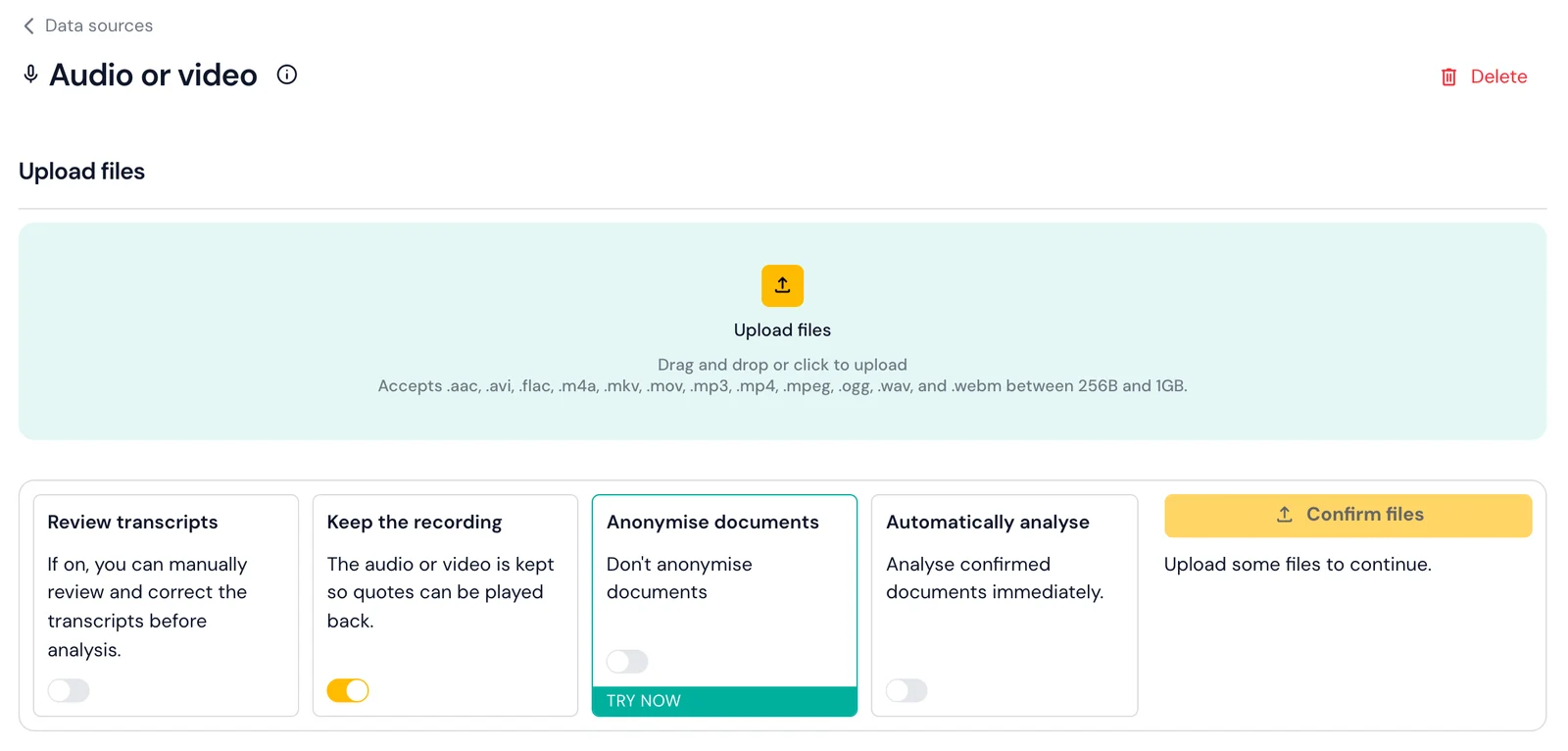
The four options on the card, as shown above, decide what happens after transcription:
| Option | What it does | When to switch it on |
|---|---|---|
| Review transcripts | Holds each transcript in a Review step so you can correct wording and speaker labels before analysis | Projects where names, jargon or quotes must be exact |
| Keep the recording | Stores the audio or video beside the transcript so quotes can be played back (on by default) | Almost always, unless your ethics approval or data policy requires destroying recordings |
| Anonymise documents | Pseudonymises the transcripts with Skimle Anonymise before analysis | Sensitive data, or transcripts that will be shared outside the team |
| Automatically analyse | Sends transcripts straight into your analysis once they are ready | Ongoing studies where new interviews keep arriving |
The docs on uploading recordings and data sources cover each setting in more detail.
Which languages and speakers does it handle?
Skimle detects the spoken language automatically and covers 100+ languages, including Finnish, Swedish, Norwegian, Danish, German, French, Spanish and Portuguese alongside English. That matters for cross-market studies and for interviews held in participants' own languages.
When a recording has more than one speaker, Skimle separates and labels them ("Speaker 1", "Speaker 2") and groups each person's consecutive turns into paragraphs with start and end timestamps. You can rename speakers to match your participants once the transcript arrives. Speaker separation (diarisation) works best when voices are distinct and people do not talk over each other; more on that in the recording tips below.
How long does transcription take?
A typical 60-minute interview is transcribed in under five minutes. Shorter files are faster and longer ones scale roughly in proportion.
How do you play a recording alongside its transcript?
When a document holds a recording, opening it shows a player docked at the top of the transcript, and it stays in place as you scroll. For a video interview you see the participant; for audio you get the playback bar alone.
The transcript follows the voice: as the recording plays, the word being spoken is underlined, so you can read along without losing your place. Clicking any word jumps the recording to that moment, which makes it quick to check a passage that reads oddly or to hear how a sentence was delivered.
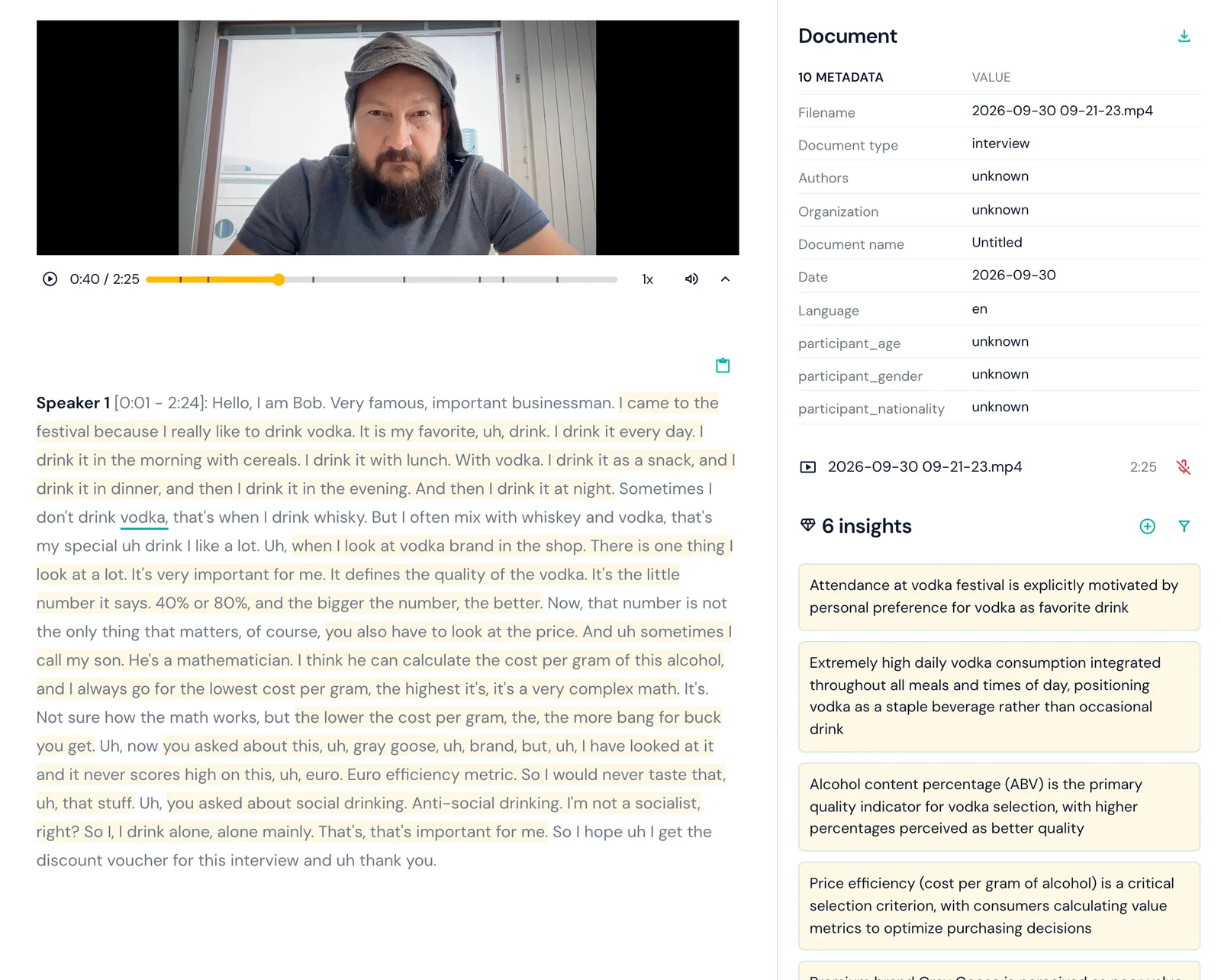
The player bar, shown above under the video, includes:
- A scrubber with a tick for every quote coded from this interview, so you can see where the evidence sits in the conversation
- Playback speed, mute and download controls
- A collapse button for video, which folds away the picture and leaves the playback bar
- No autoplay: a recording never starts on its own, so opening a transcript in a shared room does not broadcast a participant's voice
How do you trace a quote back to the moment it was said?
This is the change that matters most for research quality. Every quote in Skimle that comes from a recording has a Play button. Press it and Skimle opens the source interview, moves the player to a second before the quote begins, and plays it, with the quote highlighted in the transcript.
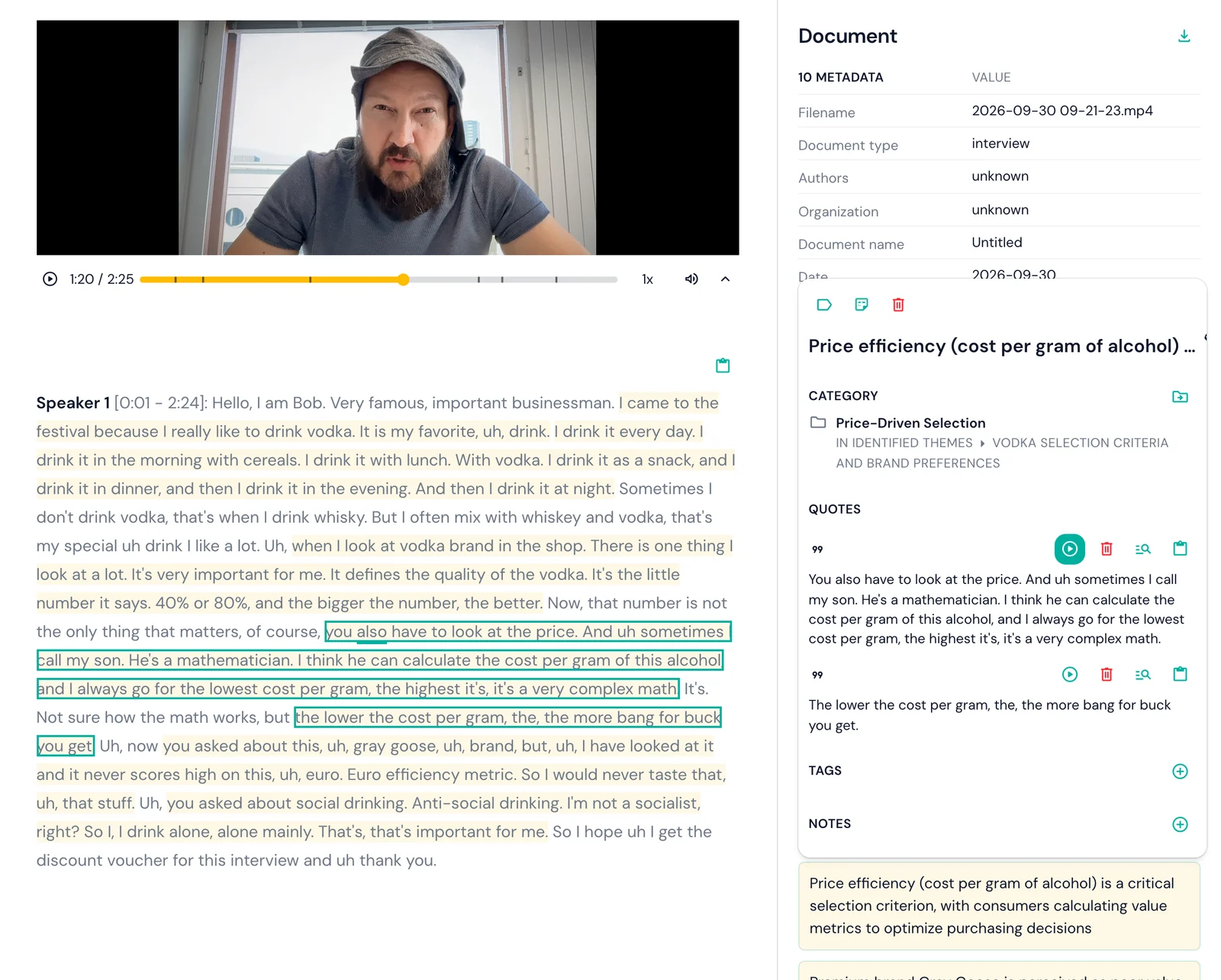
The play control appears wherever quotes do: in a document's insight panel (as above), in the categories view and in the project overview. That means you can go from a theme in a report draft to the participant saying the words in two clicks.
Why this matters in practice:
- Verifying verbatim quotes. A transcript is a model's best reading of the audio. Before a quote goes into a report or paper, you can hear it and confirm the wording.
- Hearing tone. Irony, hesitation and emphasis rarely survive transcription. "Yeah, it's great" means different things depending on how it was said, and a coded insight inherits whichever reading the text suggests.
- Showing stakeholders the evidence. Playing a participant's own words in a workshop lands differently from reading them off a slide.
- Auditing AI analysis. Every theme in Skimle already links to the passages behind it. Playback extends that chain from the passage to the recording itself, which is the idea behind two-way transparency. Our 7 checks before AI insights reach the client puts quote verification first for this reason.
If you run customer or market research interviews, see how Skimle fits market research teams; for academic projects, see Skimle for academic researchers.
What happens to the recording after transcription?
Recordings are often the most sensitive material in a study, so retention is a setting rather than a fixed rule.
- Kept by default. With Keep the recording on, the audio or video is stored privately in Skimle's EU infrastructure and is available only to members of the project. It is what powers the player and quote playback.
- Transcript only. Switch the option off on a data source and the recording is deleted by the time its transcript is ready. Nothing can be played back afterwards. The setting applies to files confirmed from then on.
- Delete later. A kept recording can be deleted at any time from the document panel, from the data source's processed files, or for a whole data source at once.
- Anonymised sources never keep recordings. If a data source anonymises its transcripts, the recording is always deleted, because a voice identifies a person however well the text is pseudonymised.
- Organisation controls. A team administrator, or an umbrella organisation such as a university, can disable keeping recordings for everyone. The option then disappears from the card, and the server enforces the same rule.
Transcription itself runs on EU-hosted infrastructure, so interview data does not leave the EU at any stage. If your ethics approval promises that recordings are destroyed after transcription, switch the option off for that data source before confirming, and note the setting in your data management plan.
How did we choose Skimle's transcription engine?
Transcription quality matters more in research than people assume at first. A voice assistant that mishears "set a timer" is a minor annoyance. A transcript that consistently mishears a product name, a technical term or a participant's name carries that error into coding, into quotes you cannot use verbatim, and into hours of correction across 30 interviews.
What we tested
Cloud-based API services from major providers were fast and accurate in English, but quality varied considerably across less common languages, with noticeably weaker results in Finnish and Swedish, which matter to many of our users. Some also routed data outside the EU.
Consumer note-taking tools are good at meeting summaries but not built for research-grade output: they often strip timestamps, handle multi-speaker recordings poorly, and need manual export steps.
Local open-source models, primarily OpenAI's Whisper, produce good output and can run entirely on your own machine, which suits institutions that forbid audio leaving their environment. Running locally in real time, though, a 60-minute interview takes about 60 minutes. The practical setup guide covers local Whisper as a backup option.
What mattered most
Our criteria, in order of importance for qualitative research:
- Accuracy across languages, as much research is not done in English
- Speaker diarisation quality, separating voices correctly
- Data security, with no processing outside the EU
- Speed, fast enough not to interrupt the research workflow
- Cost, low enough at research volumes that we could price transcription fairly
The engine we integrated performed best on the combination of these factors.
What does transcription cost?
In Skimle, one minute of transcription uses one credit. The free plan includes 200 credits, which covers more than three hours of recordings, and on paid plans transcription works out at around $6 (€5) per hour depending on the plan.
For comparison, NVivo's pay-as-you-go transcription costs about $30 per hour (€28.50 excluding VAT), falling to around $10 (€9) per hour on a prepaid 50-hour annual package, and MAXQDA's transcription add-on costs around $7.50 to $10 (€7 to €9) per hour in prepaid bundles. Our comparison of AI transcription tools for researchers covers the wider market, and NVivo pricing in 2026 breaks down what the add-ons cost in total.
Integrating transcription also means one security perimeter. The recording, transcript and analysis stay in the same project, with no separate service to sign up for and no files to convert and import.
How do you get the best transcripts from your recordings?
The engine is only half of transcription quality; the recording is the other half.
Recording quality
- Quiet room. Background noise reduces accuracy more than almost anything else. Close windows, turn off fans, and avoid cafés for important interviews.
- Phone on the table. If you record on a smartphone, place it on the table with the microphone end (usually the bottom) towards the speaker.
- Right distance. Aim for 30 to 60 centimetres between microphone and mouth. Closer risks distortion; further picks up more room than voice.
- One speaker at a time. Overlapping speech is the main cause of speaker-labelling errors. Brief pauses between speakers help a lot.
If audio quality is a recurring problem, a clip-on wireless microphone (such as the RØDE Wireless GO II, around $270 (€250)) is a significant upgrade. The practical setup guide covers equipment options.
Reviewing the transcript before analysis
AI transcription handles accents, varied speech and moderate background noise well. It handles proper nouns less well: company and product names, acronyms and unusual personal names.
An error rate of 2 to 5% is acceptable for qualitative analysis, where you work with meaning rather than word counts. Spot-correct the terms that matter: key concepts, names you plan to quote, and acronyms that recur in your codes. Search for the expected terms first, fix those, then skim the rest; for a 60-minute interview this takes 10 to 15 minutes.
With Review transcripts switched on, this happens in a dedicated step before analysis starts. With a kept recording, you can click any doubtful word to hear the original instead of guessing.
What happens after transcription?
Anonymise before sharing
If transcripts will be shared with colleagues, clients or reviewers, or participants were promised anonymity, anonymise them first. Skimle Anonymise detects identifiers across six categories (names, titles, locations, organisations, dates and other), applies the same rules across every file, and produces an audit report of each decision. Remember that an anonymising data source does not keep recordings. For business and HR settings, see our guide on anonymising interview transcripts for compliance.
Move to analysis
Once transcripts are ready, Skimle's analysis reads each one, builds a shared category structure across all interviews, and links every insight to the quotes that support it, which are now also playable. The guide on how to analyse interview transcripts walks through this from first read to synthesis, and the multi-language analysis guide covers projects with interviews in several languages. To work with your transcripts from other AI tools, see agentic chat and MCP. For the full product tour, read what is Skimle.
Frequently asked questions
Which file formats can I upload for transcription?
Skimle accepts .aac, .avi, .flac, .m4a, .mkv, .mov, .mp3, .mp4, .mpeg, .ogg, .wav and .webm files up to 1 GB each. Video files go in as they are; there is no need to extract the audio first.
Does Skimle keep my audio and video recordings?
By default, yes: the recording is stored privately in the EU so quotes can be played back. You can switch this off per data source, in which case the recording is deleted by the time the transcript is ready, or delete kept recordings later. Anonymised data sources never keep recordings, and team administrators can disable keeping altogether.
Can I play a quote from the original recording?
Yes. Every quote that comes from a kept recording has a Play button, in the document's insight panel, the categories view and the project overview. It opens the interview and plays from a second before the quote begins.
How much does transcription cost in Skimle?
One minute of transcription uses one credit. The free plan's 200 credits cover more than three hours of recordings, and paid plans work out at around $6 (€5) per hour, compared with about $10 to $30 per hour for the transcription add-ons of NVivo and MAXQDA.
Can I correct a transcript before it is analysed?
Yes. Switch on Review transcripts on the data source and each transcript waits in a Review step, where you can fix wording and speaker labels, until you approve it for analysis.
Ready to try it on your own interviews? Start for free and upload your first recording today. The free plan includes more than three hours of transcription, and you can be listening back to coded quotes within minutes.
Want to go deeper on the workflow? Read the end-to-end practical interview setup guide, or jump to how to analyse interview transcripts once your transcripts are ready.
Compare options: Best AI transcription tools for researchers in 2026
About the authors
Henri Schildt is a Professor of Strategy at Aalto University School of Business and co-founder of Skimle. He has published over a dozen peer-reviewed articles using qualitative methods, including work in Academy of Management Journal, Organization Science, and Strategic Management Journal. His research focuses on organisational strategy, innovation, and qualitative methodology. Google Scholar profile
Olli Salo is a former Partner at McKinsey & Company where he spent 18 years helping clients understand their markets and themselves, develop winning strategies, and improve their operating models. He has conducted over 1000 client interviews and published over 10 articles on McKinsey.com and beyond. LinkedIn profile