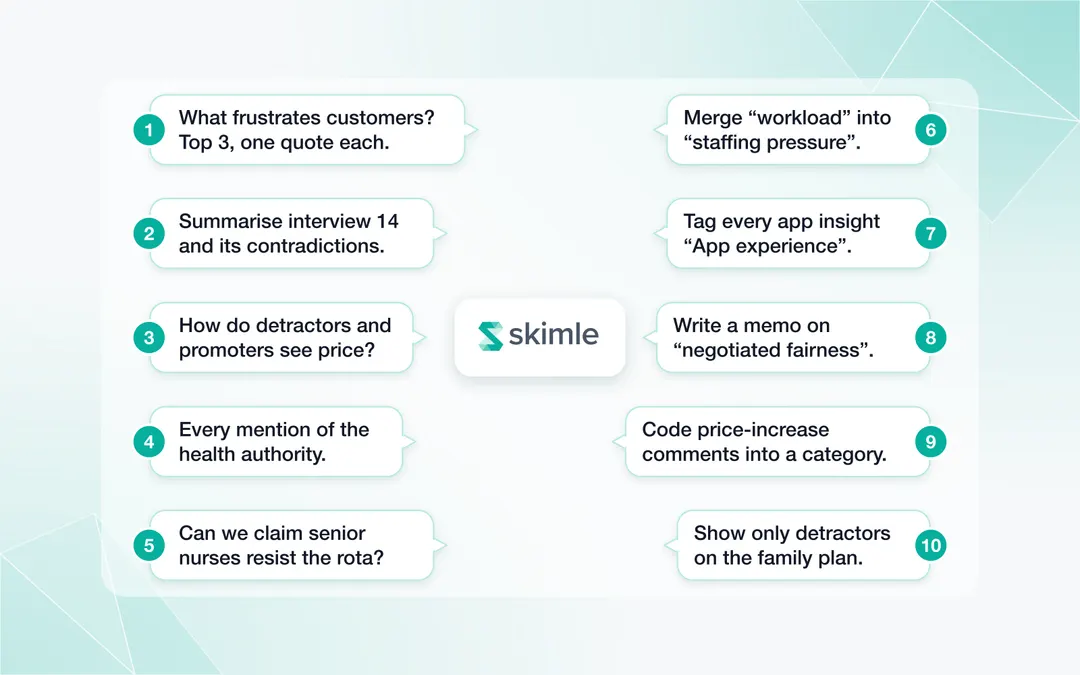
To use Skimle's chat, open a project that has been analysed and ask questions in plain language in the chat panel. The chat answers from your coded data with verbatim quotes and links back to each source, compares groups, checks whether a claim holds, and can reorganise categories, add tags, write notes and start new analyses after you confirm each change.
That last part is what separates it from pasting transcripts into a general chatbot. The chat works on the structured project Skimle has already built (documents, categories, insights, quotes, metadata, tags and notes), so it can count, cite and act instead of only paraphrasing. This guide explains the ten things it can do and then follows two fictional researchers from the first question to the final report: a PhD student building grounded theory from interviews (the academic research case) and a customer insights lead working through 300 feedback comments (the customer and market research case).
AI assistance is no longer unusual in this work. In MRII's February 2025 survey of 426 market researchers, 62% said they or their team were using AI in their work, up 23 percentage points from the year before. The question has moved from whether to use it to how to use it without losing rigour.
The one-minute video below walks through all ten, in the same order as this guide, on demo projects of customer comments and festival interviews.
What can Skimle's chat do?
The chat has two kinds of abilities. Read actions answer questions and never change anything. Write actions change the project, and each one appears as a card you accept or decline before anything happens. Read-only collaborators only get the read actions and navigation.
| What you want | Example prompt | What the chat does |
|---|---|---|
| 1. Find evidence with quotes | "What frustrates customers most about delivery? Top 3 with one quote each." | Searches the coded insights semantically and answers with verbatim quotes linked to their documents |
| 2. Read one document closely | "Summarise interview 14 and list where she contradicts herself." | Reads the full document and answers about it alone |
| 3. Compare groups or periods | "How do detractors and promoters talk differently about price?" | Compares categories across metadata values against the project baseline, or over time |
| 4. Follow a named person, organisation or place | "Every mention of the regional health authority, by interview." | Finds named entities, which semantic search tends to miss |
| 5. Test a claim before you write it | "Can we say senior nurses resist the new rota more than junior ones?" | Counts the supporting evidence, shows where it sits and says whether it holds |
| 6. Reorganise the codebook | "Merge 'workload' into 'staffing pressure' and move it under 'working conditions'." | Proposes the merge, move or rename as a card; accepted changes can be undone |
| 7. Tag across categories | "Tag every insight that mentions the app with 'App experience'." | Creates the tag and applies it across all categories |
| 8. Write notes and memos | "Write a memo on the tension between autonomy and fairness, citing insights." | Attaches a Markdown note to the documents, insights or categories you name |
| 9. Run new analyses | "Find every comment about price increases and code them into a new category." | Estimates how much it will find, then opens the extraction wizard; can also start a full thematic or codebook analysis |
| 10. Navigate and filter | "Show only the documents from TV subscribers who are detractors." | Moves the app to the right view and applies the filter, so you see the evidence yourself |
A few behaviours sit around these ten. The chat suggests follow-up questions after each answer, asks a clarifying question when a request is ambiguous (two categories with similar names, for instance), and has an undo for the last change it made. On a Skimle Ask interview guide, it can also add, reword and reorder questions directly. The full reference is in the Agentic Chat documentation.
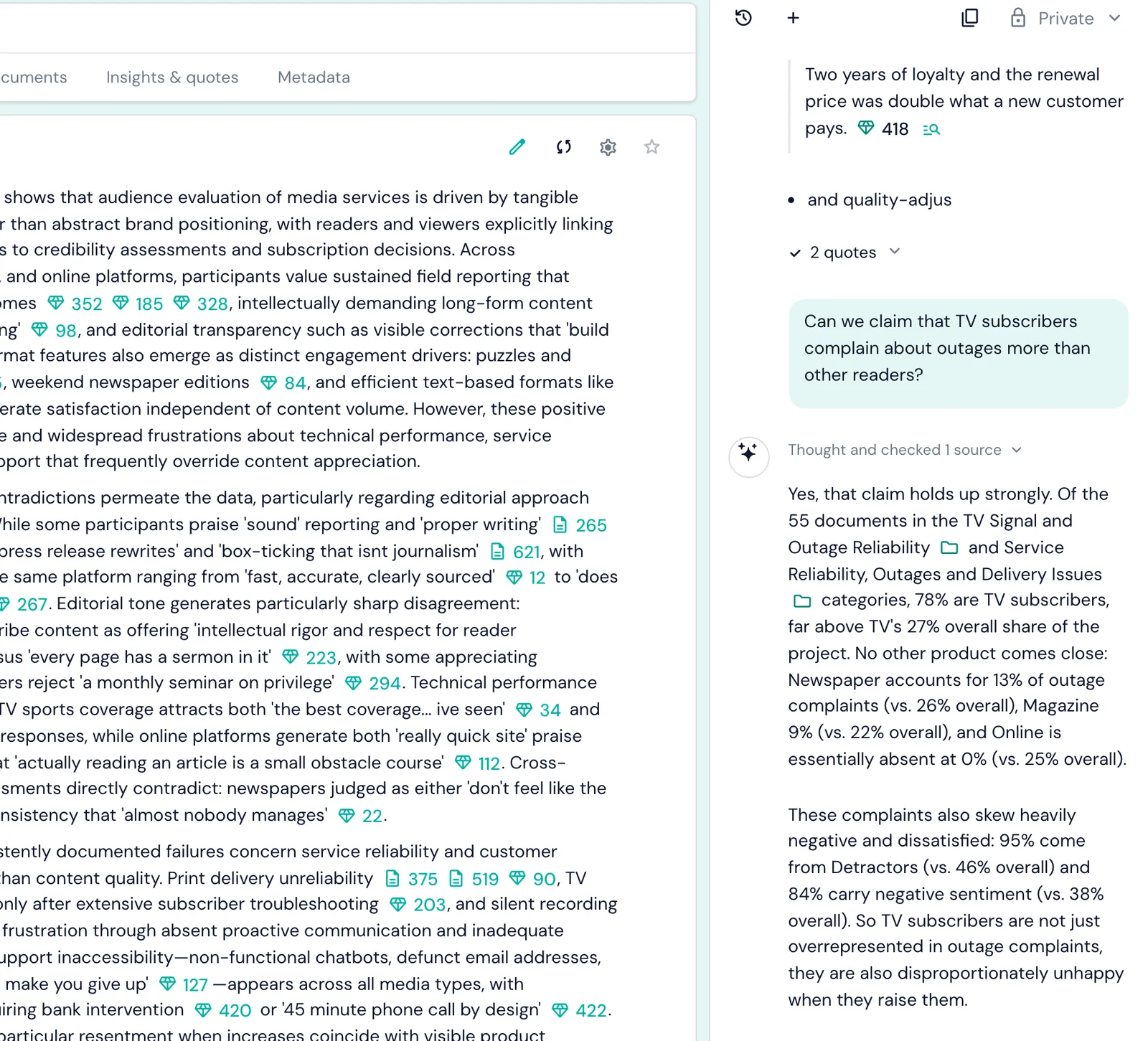
The screenshot below shows the chat testing a claim on a project of 900 media customer comments. Asked whether TV subscribers complain about outages more than other readers, it compares their share of the outage categories (78%) with their share of the whole project (27%) and adds that 95% of those complaints come from detractors.
How does the chat stay grounded in your data?
General chatbots answer from whatever text fits in their context window, and they cannot tell you how many respondents said something. We covered that gap in detail in can ChatGPT analyse qualitative data?. Skimle's chat is built the other way round. It works through tools that query the coded project, so its answers rest on four things you can check:
- Every claim carries its source. Quotes are verbatim and link to the insight and document they came from.
- Counts come from the codebook. When the chat says 41 insights from 23 respondents, those are rows in your project, not an estimate in a sentence.
- Changes need your approval. Merges, tags, notes and new analyses wait for you to accept a card, and the merges and tag changes can be undone.
- Permissions apply. A colleague with view access can question and navigate the project but cannot change it through the chat.
This matters most at the two ends of a project. Early on, it stops a confident summary from setting your categories before you have read anything. At the end, it lets you check every sentence of the report against the data before a reviewer or a client does.
Example 1: how does an academic use the chat to build grounded theory?
Maria is a PhD researcher studying how hospital nurses adapt when wards adopt AI-assisted rota planning. She has 24 semi-structured interviews of about an hour each, with metadata for ward type, seniority and hospital. Her method is constructivist grounded theory in Charmaz's tradition: initial coding, focused coding, constant comparison and memo writing until her categories saturate.
Done by hand, this is slow. A 2024 team-based coding study in the International Journal of Qualitative Methods reports that indexing a single 1 to 1.5 hour interview takes a coder about two hours, before any analytical coding starts. For 24 interviews that is roughly 50 hours of first-pass work. Maria uses Skimle's automatic thematic analysis as a first pass across all 24 interviews, then uses the chat for the parts of grounded theory that are about comparison and judgement. She still codes the first four transcripts line by line herself, so that her early codes come from her own reading and she can judge where the automatic pass is too coarse.
Stage 1: getting oriented without being led
Maria's first prompts are deliberately open, so the analysis does not hand her a story too early:
"Before I read the categories: which interviews are the most different from the rest, and why?"
The chat names four outliers (two night-shift nurses, a ward manager and a nurse who had left the profession) with a sentence on each. She reads those four transcripts in full first, which is the kind of theoretical sensitivity grounded theory asks for.
Stage 2: constant comparison across cases
Constant comparison is where the chat earns its place. Maria asks:
"Compare how senior and junior nurses describe the moment the rota is published. Quotes from both."
The chat compares the relevant categories across the seniority field and reports that junior nurses describe the rota as fairer and more predictable, while senior nurses describe losing informal swaps they used to negotiate. It shows six quotes from each group. Maria follows up with "Does this hold on night-shift wards?" and the pattern weakens, which becomes a property of her emerging category rather than a blanket finding.
Stage 3: memo writing
Memos are the backbone of grounded theory, and Maria writes her own. She uses the chat to keep them tied to evidence:
"Write a memo draft on 'negotiated fairness': the idea that nurses value rota fairness only when they still control the exceptions. Cite the insights that support and contradict it."
The note lands on the category with its citations attached. She rewrites it in her own voice, but the evidence trail stays.
Stage 4: focused coding and reorganising categories
After two weeks of comparison, Maria's categories need restructuring. Instead of dragging insights one by one, she asks:
"Merge 'swap requests' and 'informal trades' into one category called 'negotiating exceptions', and move it under 'control over time'."
The chat proposes both changes as cards. She accepts the merge, declines the move after reading the card, and asks for a different parent. Each accepted change appears in the categories view at once and can be undone.
Stage 5: theoretical sampling and saturation
Grounded theory asks you to look for what is missing. Maria asks:
"Which participants have not said anything about 'negotiating exceptions'? What do they have in common?"
The answer (mostly agency nurses with no stable team) tells her where to recruit her next five interviews. When those come in, the new data is analysed automatically and she repeats the comparison.
Stage 6: checking claims before writing the paper
Before submitting, Maria tests every claim in her findings section:
"Can I claim that most senior nurses experienced the AI rota as a loss of autonomy? How many, and who disagrees?"
The chat reports 11 of 14 senior nurses with supporting insights and points to the three who disagree, with quotes. She changes "most" to "eleven of fourteen" and adds the counter-cases, which a reviewer would otherwise have asked for.
If you work in academic research, see how Skimle fits an academic workflow, from ethics-friendly anonymisation to REFI-QDA export into NVivo or ATLAS.ti.
Example 2: how does a customer insights lead use the chat on 300 feedback comments?
Jonas leads customer insights at a meal-kit subscription company. After a price change he has 300 open-text comments from a post-cancellation survey, exported as a spreadsheet with columns for plan, tenure, NPS score and region. Leadership wants to know why customers are leaving within a week.
Stage 1: from spreadsheet to analysed project
Jonas imports the spreadsheet, so each row becomes a document and each column becomes a metadata variable. He then asks the chat to start the work:
"Run a thematic analysis on these comments."
The chat confirms the analysis it is about to start, and within minutes the comments are coded into categories with insights and quotes.
Stage 2: the headline answer, with evidence
"What are the top five reasons people cancelled? Give a count and one quote for each."
The chat lists price, recipe repetition, delivery windows, portion size and app problems, each with a count and a quote. The counts matter: price comes first, raised in 96 of the 300 comments, but recipe repetition is close behind at 81, which is not what the leadership team assumed. Because many comments give more than one reason, the five counts add up to more than 300.
Stage 3: comparing segments
"How do detractors and passives talk differently about price?"
Detractors mostly describe the increase as unannounced, passives describe the new price as poor value against supermarket alternatives. Those need different responses, one about communication and one about the offer. The same comparison can be explored visually with metadata analysis, as in our worked example with 900 media comments.
Stage 4: digging into one topic with a new analysis
Price increases cut across several categories, so Jonas asks for a focused pass:
"Find every comment about the price increase and code them into a new category."
The chat first estimates how many comments it is likely to find and in which documents, then opens the extraction wizard pre-filled with that description. Jonas adjusts the scope and runs it. The new category holds 74 comments with quotes, 19 of which mention the email announcing the change.
Stage 5: tagging for the people who need it
"Tag every insight about the mobile app with 'For product team', and every insight about delivery with 'For operations'."
Tags cut across the category structure, so each team gets one filtered list of the evidence that concerns them. See tags and notes for how they appear elsewhere in the project.
Stage 6: checking the story before it reaches leadership
Jonas drafts three headline claims and tests each one:
"Can we say customers on the family plan cancel mainly because of portion sizes?"
The chat replies that portion size is the second reason on the family plan, behind price, and shows the numbers. The claim changes before it reaches a slide. Jonas also notes that the survey only reached people who cancelled, so the deck describes why leavers left, not how satisfied current customers are. Finally, he asks the chat to "open the export centre" and exports the price quotes for the deck.
The same workflow applies to NPS verbatims at scale, support tickets or app reviews. See how Skimle fits customer and market research teams.
What kinds of prompts work best?
The chat understands plain language, so there is no syntax to learn. A few habits make answers sharper:
| Weaker prompt | Stronger prompt | Why it works better |
|---|---|---|
| "What do people think?" | "What are the top 3 complaints about onboarding, with one quote each?" | Scope, number and evidence are explicit |
| "Is price a problem?" | "Can we claim price is the main reason enterprise customers churn? How many say so, and who disagrees?" | Asks for a count and counter-evidence |
| "Tell me about the nurses." | "Compare how senior and junior nurses describe the rota, with quotes from both." | Names the metadata field to compare |
| "Clean up my categories." | "Merge 'workload' into 'staffing pressure' and rename it 'staff capacity'." | A specific change the chat can propose as a card |
| "Find stuff about the email." | "Find every comment that mentions the price-change email and code it into a new category." | Turns a search into a reusable analysis |
Three further tips:
- Name categories and metadata fields as they appear in the project. The chat knows them, and exact names avoid a clarifying question.
- Ask it to show you, not only tell you. "Filter to these documents" or "open that interview" puts the evidence on screen, where you can read it yourself.
- Keep one conversation per question. Starting a fresh chat for a new topic keeps answers focused and avoids mixing two lines of enquiry.
What should you not use the chat for?
The chat speeds up retrieval, comparison and housekeeping. It does not replace interpretation:
- It does not decide what your findings mean. In Maria's study, deciding that "negotiated fairness" is a core category is her theoretical judgement, informed by the evidence the chat surfaces.
- Counts are counts of coded insights. They describe the coded data, not the population. A category with 41 insights from 9 people is a different finding from 41 insights from 30 people, so ask for both numbers.
- It is not a substitute for reading. Use it to decide what to read next, not to avoid reading altogether. Outliers and contradictions are where theory comes from.
If you want an AI to work through a research question end to end, including a written report, agentic analysis does that as a separate, documented mode. If you prefer working from Claude, Cursor or another AI tool, the same project tools are available over MCP, as described in our step-by-step guide to Agentic Chat and MCP.
Frequently asked questions
Does Skimle's chat make up quotes?
No. Quotes come from the coded project data and link to the document they came from, so you can open the source and read the quote in context. If a claim has no supporting insight, the chat says so instead of inventing one.
Can the chat change my analysis without me knowing?
No. Every change (merging or moving categories, tagging, writing notes, starting analyses) appears as a card you accept or decline. Merges and tag changes can be undone, and collaborators with view-only access cannot make changes through the chat at all.
How is this different from using ChatGPT on my transcripts?
ChatGPT works on whatever text you paste and cannot count reliably across a whole project. Skimle's chat queries a project that has already been coded, so it can give counts, compare metadata groups and trace every answer to its source. See our comparison of qualitative analysis tools for how this fits alongside NVivo, MAXQDA and ATLAS.ti.
Does the chat work for methods other than grounded theory?
Yes. It supports reflexive thematic analysis, framework analysis, content analysis and deductive coding against your own codebook equally well, because its tools work on categories and insights rather than on one method's vocabulary.
What language can I use with the chat?
You can write in any language Skimle supports. The chat answers in the language you use, and quotes stay in the language of the original document.
Try it on your own project
Ready to question your own data? Try Skimle for free: upload a few interviews or a spreadsheet of comments, let the analysis run, then open the chat and ask your first question.
Want to go further? Read our guides on grounded theory in practice, analysing NPS verbatims at scale and working with Agentic Chat and MCP.
About the authors
Henri Schildt is a Professor of Strategy at Aalto University School of Business and co-founder of Skimle. He has published over a dozen peer-reviewed articles using qualitative methods, including work in Academy of Management Journal, Organisation Science, and Strategic Management Journal. His research focuses on organisational strategy, innovation, and qualitative methodology. Google Scholar profile
Olli Salo is a former Partner at McKinsey & Company where he spent 18 years helping clients understand the markets and themselves, develop winning strategies and improve their operating models. He has done over 1000 client interviews and published over 10 articles on McKinsey.com and beyond. LinkedIn profile