The best qualitative data analysis software for Mac in 2026 is either a tool with full cross-platform parity (MAXQDA, ATLAS.ti) or a web-based tool that runs identically in any browser (Skimle, Dedoose, Delve, Taguette). NVivo for Mac still lacks features available on Windows, so Mac-based researchers should weigh alternatives carefully before committing.
Mac users have been second-class citizens in qualitative data analysis software for most of its history. The major CAQDAS packages were built for Windows first, and Mac versions arrived later, with fewer features, or not at all. That mattered less when qualitative researchers worked on university-issued Windows machines. It matters a great deal now, because researchers increasingly work on Macs: according to Omdia data reported by Computerworld, Macs reached 16% of the overall US PC market in 2025, growing at 11.2% against an industry average of 3.3%, and took 15.7% of the market including education in the final quarter of the year.
This guide covers where the Mac gap actually bites in 2026, which tools offer full parity on macOS, and why web-based tools make the whole question irrelevant. If you want the broader landscape beyond the Mac question, our complete QDA software comparison puts every major tool side by side.
Why is Mac support a problem in qualitative data analysis software?
The short answer: because the most widely cited QDA tool, NVivo, has never treated its Mac version as an equal product. Lumivero's own documentation is direct about this: NVivo for Windows has the full feature set, and NVivo for Mac has a subset of it.
The gaps are not cosmetic. According to the University of Lethbridge library's NVivo guide, features unavailable or restricted in NVivo for Mac include:
- Compound and group queries
- See-also links
- Sentiment coding and relationship coding
- Dynamic sets
- Project maps and reports
- Annotations on non-text files
Framework matrices, a core tool for the framework method widely used in health and policy research, only arrived in NVivo 15 for Mac in October 2025, per the NVivo 15 Mac release notes. That is more than a decade after Windows users got them.
The platform split runs deeper than missing menu items. NVivo for Windows and NVivo for Mac are separate applications with different project file formats (.nvp on Windows, .nvpx on Mac). Moving a project between platforms requires conversion, and conversion is lossy in specific, annoying ways: project items created by Windows-only features are hidden when opened on a Mac, and Mac projects larger than 10 GB may fail to convert to Windows at all. Lumivero's guidance for mixed teams is telling: keep the master project on Windows, because that is where the full feature set lives. NVivo Collaboration Server, the on-premises teamwork option, is Windows-only outright.
For a PhD student who owns a MacBook (which, given campus buying patterns, is more likely than not), this creates a bad set of choices: pay full price for a reduced product, run Windows in a virtual machine, or camp in the university computer lab. None of these is a good use of research time.
Which legacy QDA tools run natively on Mac with full feature parity?
Two of the traditional desktop packages handle macOS properly: MAXQDA and ATLAS.ti.
MAXQDA: verified full parity
MAXQDA is the clearest counterexample to NVivo's approach. VERBI, the Berlin-based company behind it, states in its official support documentation that since MAXQDA 12 the software has been the same product on both platforms, with any visible differences owed to the operating system's own interface conventions rather than the feature set. The same project file opens on either platform without conversion, which removes the file-format friction that plagues NVivo teams.
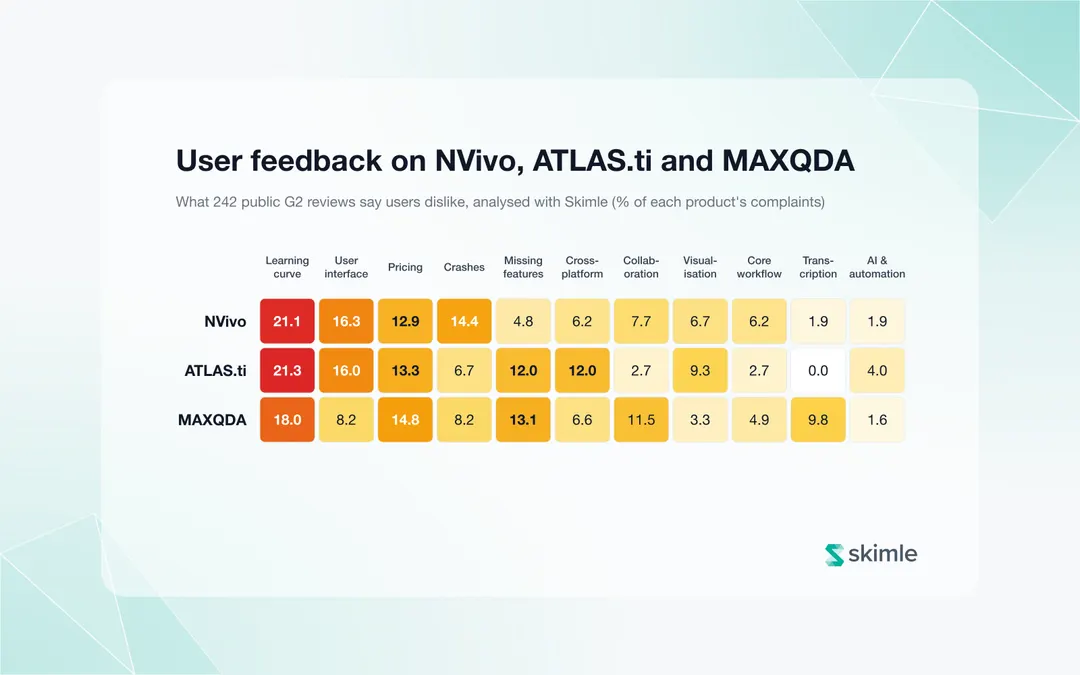
The caveats are the usual ones for traditional tools rather than Mac-specific ones: the learning curve is steep, AI features are supplementary add-ons rather than the core of the workflow, and team collaboration (TeamCloud) costs extra. The NVivo and MAXQDA alternatives roundup covers the options if those trade-offs bother you. User reviews back up MAXQDA's platform parity: in our analysis of 242 G2 reviews, cross-platform problems made up 12% of ATLAS.ti complaints but under 7% for MAXQDA.
ATLAS.ti: native Mac app, near parity
ATLAS.ti ships a native macOS application alongside its Windows version, designed with a native interface on each system rather than a port. Functionality is essentially the same across platforms; the differences that remain are about where things sit in the interface rather than what the tool can do. Projects transfer between Mac and Windows, and both desktop versions can exchange projects with ATLAS.ti Web.
One nuance worth knowing: ATLAS.ti Web, the browser version, is a reduced product compared to the desktop apps. The company's own feature comparison shows the web version accepts fewer file formats (docx and PDF only), has simpler search and memo features, and lacks some visualisations. So a Mac user gets the full product via the desktop app, and the web version serves as a lighter companion.
ATLAS.ti is now owned by Lumivero, the same private-equity-backed parent as NVivo; whether the Mac commitment survives that consolidation is worth watching. Our ATLAS.ti alternatives guide covers the escape routes if you would rather not find out the hard way.
Why do web-based tools sidestep the Mac problem entirely?
A tool that runs in the browser has no Mac version and no Windows version. There is one product, and it behaves identically on a MacBook, a Windows desktop, a Linux workstation, or a locked-down university machine where you cannot install software at all. No file-format conversion, no feature matrix to consult, no "master copy on Windows" workarounds.
Four tools in this category are worth serious consideration for Mac users in 2026.
Skimle: AI-native analysis, identical on every platform
Skimle is a fully web-based, AI-native qualitative analysis tool. Because it runs entirely in the browser, the experience on a Mac is the same as on any other machine, down to the pixel. There is nothing to install, nothing to update, and no platform-specific feature list.
The bigger difference is the analytical model. Where traditional tools give you an empty codebook and a highlighter, Skimle runs structured thematic analysis across your entire corpus first, then hands you the results to review, challenge, and refine. Every theme links back to source excerpts and from there to the original document, which keeps the analysis defensible in peer review. Transcription and anonymisation are built in, and REFI-QDA export means you can move your project into NVivo, MAXQDA, or ATLAS.ti later if you need to.
Pricing starts at a generous free tier, and paid plans at €20 (approximately $22) per month for the Starter tier, with academic pricing available on the pricing page.
Dedoose: browser-based collaboration on a budget
Dedoose was built browser-first by UCLA researchers precisely to avoid platform lock-in, and it remains the established budget choice for collaborative manual coding. It works identically on Mac, Windows, Linux, and Chromebooks. Individual plans cost $17.95 (€16) per active month, student plans $12.95 (€12), and you are only charged for months you log in.
Its strengths are built-in interrater reliability statistics and mixed-methods descriptor variables. Its weaknesses: no meaningful AI features, a dated interface, and no REFI-QDA export. Our Dedoose review covers it in full.
Delve: simple web-based coding for beginners
Delve is a deliberately minimal web-based coding tool aimed at students and first-time qualitative researchers. It runs in any browser, so Mac support is automatic. Coding is manual, with an AI chat assistant layered on top, and the education plan runs around $18 (€16) per user per month. It suits small, straightforward projects; it strains on large corpora or complex analytical designs. See our full Delve review for the details.
Taguette: free, open source, runs anywhere
Taguette is a free and open-source tagging tool that runs in the browser, either installed locally on your Mac or via the free hosted server at app.taguette.org. It handles basic highlight-and-tag coding of text documents and exports your tagged excerpts. There are no queries, no visualisations, and no AI, but the price is zero and the platform question simply does not arise. The free QDA software roundup compares it against the other no-cost options.
How do the 6 best Mac options compare?
| Tool | Mac support | Pricing | AI features |
|---|---|---|---|
| Skimle | Web-based, identical on every platform | Free tier, paid starting at €20 (~$23)/month, academic pricing available | Full AI-native analysis with source traceability |
| MAXQDA | Native app, full parity with Windows | ~$250 (€230)/year academic | AI Assist add-on, supplementary |
| ATLAS.ti | Native Mac app, near parity | ~$110 (€100)/year academic | Supplementary AI coding tools |
| Dedoose | Web-based, platform-independent | $18 (€16)/month, $13 (€12) student | None |
| Delve | Web-based, platform-independent | ~$18 (€16)/month education | AI chat assistant |
| Taguette | Web-based or local install, free | Free | None |
| NVivo (for reference) | Native app, reduced feature set | $295–$595 (€270–€545)/year academic | AI Assistant add-on |
NVivo appears for reference because many Mac users start their search with it. The plain summary: if NVivo is a hard requirement (a supervisor insists, or your department teaches it), you will get a workable but incomplete product on macOS. If NVivo is merely the default you inherited, the six tools above all serve Mac users better.
What does a Mac-based research workflow look like in practice?
The Mac question extends beyond the analysis software itself. A complete qualitative workflow on Apple hardware, from data collection to write-up, looks like this in 2026:
Record on your iPhone. The built-in Voice Memos app records interviews in high quality, and recordings sync to your Mac automatically via iCloud. For remote interviews, Zoom and Teams both run natively on Apple silicon and can record locally.
Transcribe in the browser. Upload the audio straight into a web-based tool rather than juggling a separate desktop transcription package. Skimle transcribes interview audio as part of the same project that holds your analysis, and accepts the common audio formats an iPhone produces.
Analyse in the browser. With a web-based tool, the analysis stage carries no platform risk: nothing to install, nothing that breaks with a macOS update, and the same interface if you switch machines mid-project.
Anonymise before sharing. If your ethics approval requires pseudonymisation, doing it inside the analysis tool (Skimle Anonymise handles this) avoids exporting sensitive transcripts to yet another application.
Write up in whatever you like. Export coded data to Word or Excel, or to REFI-QDA if a collaborator works in a desktop CAQDAS package.
The pattern worth noticing: every step that runs in the browser is a step where "does it work on my Mac?" stops being a question you need to ask. For a fuller treatment of the recording-to-themes pipeline, see our guide to a practical interview setup with recording, transcription, and AI-assisted theme identification.
Which tool should you choose as a Mac user?
The decision comes down to what kind of researcher you are and how much the platform question has burned you before.
Choose MAXQDA if you want a traditional, full-featured desktop CAQDAS package and refuse to accept a reduced Mac product. Its parity claim is documented and has held since version 12. It is the like-for-like NVivo replacement for Mac users.
Choose ATLAS.ti if you prefer its analytical style or your institution has a campus licence. The Mac desktop app is a proper native product, not an afterthought.
Choose Dedoose or Taguette if budget dominates every other consideration and you are content coding everything manually. Dedoose adds collaboration and interrater reliability for a modest monthly fee; Taguette costs nothing.
Choose Delve if you are new to qualitative analysis, your project is small, and you value simplicity over analytical depth.
Choose Skimle if you want AI to do the heavy first pass across your corpus while you focus on interpretation, with every finding traceable back to the source. For academic researchers weighing up rigour, cost, and time, Skimle's academic workflow was built for exactly this situation, and because it is fully web-based, the Mac question never comes up. PhD students choosing their first serious tool should also read our tools guide for PhD students.
If you are still unsure what this whole software category does and whether you need it at all, start with what CAQDAS actually is.
Frequently asked questions
Is NVivo available for Mac?
Yes, but NVivo for Mac is a separate application with a subset of the Windows feature set. Compound and group queries, see-also links, sentiment and relationship coding, dynamic sets, project maps, and reports are missing or restricted, and the two platforms use different project file formats that require conversion.
Does MAXQDA really work the same on Mac and Windows?
Yes. VERBI's support documentation states that since MAXQDA 12 the software has been the same product on both platforms, and the same project file opens on either without conversion. Differences are limited to operating-system interface conventions such as button styling and menus.
Can I run NVivo for Windows on a Mac with Parallels or a virtual machine?
Technically yes: NVivo for Windows runs inside a Windows virtual machine on Apple silicon via Parallels. In practice you are paying for a Windows licence, a Parallels licence, and an NVivo licence, then dedicating a chunk of RAM to a second operating system, to work around a gap the vendor has left open for a decade. Most researchers are better served by a tool that treats macOS as a first-class platform.
Are web-based QDA tools safe for confidential research data?
They can be, but check the specifics: where the data is hosted, whether the vendor is GDPR-compliant, and whether anonymisation is available before data leaves your control. EU-hosted tools with built-in pseudonymisation (Skimle offers both) simplify ethics approval considerably compared to tools that require sending data to third-party services.
Ready to stop worrying about what your analysis software runs on? Try Skimle for free and get AI-assisted qualitative analysis with full source traceability, identical on a Mac, a PC, or anything else with a browser.
Want to keep comparing? Read our complete QDA software comparison and the NVivo vs MAXQDA head-to-head.
About the authors
Henri Schildt is a Professor of Strategy at Aalto University School of Business and co-founder of Skimle. He has published over a dozen peer-reviewed articles using qualitative methods, including work in Academy of Management Journal, Organisation Science, and Strategic Management Journal. His research focuses on organisational strategy, innovation, and qualitative methodology. Google Scholar profile
Olli Salo is a former Partner at McKinsey & Company where he spent 18 years helping clients understand the markets and themselves, develop winning strategies and improve their operating models. He has done over 1000 client interviews and published over 10 articles on McKinsey.com and beyond. LinkedIn profile
Sources
- NVivo FAQs (Mac vs Windows differences) - University of Lethbridge Library
- NVivo 15 Mac release notes - Lumivero/QSR International
- Are there any differences between MAXQDA on Mac and Windows? - MAXQDA Support
- MAXQDA pricing - VERBI GmbH
- ATLAS.ti Desktop - ATLAS.ti
- ATLAS.ti Desktop vs Web feature comparison - ATLAS.ti
- Dedoose pricing and subscriptions - Dedoose
- Taguette - NYU Libraries research guide
- Apple's Mac grabs 11% of US enterprise market share - Computerworld