The easiest qualitative data analysis software to learn depends on what "easy" means. For manual coding, Taguette and Delve get you applying codes within an hour. For the fastest route to actual findings, AI-native Skimle reads your documents and suggests a category structure in minutes, so there is less interface to learn and steps to take before insights. NVivo and ATLAS.ti take days to weeks.
That is the short answer. The longer answer is more interesting, because the meaning of "easy to learn" has shifted. For twenty years, picking easy qualitative analysis software meant picking the simplest manual coding interface. You still did all the reading, highlighting, and labelling yourself; the tool just made the mechanics less painful. AI-native tools changed the question. When the software does the first coding pass and you review and refine the result, the learning curve stops being about mastering an interface and starts being about learning to evaluate an analysis. This guide walks through both kinds of "easy", with time-to-first-result estimates for each tool, and is written for the people who ask this question most: masters students facing their first coding project, PhD students who want their supervision hours spent on findings rather than software troubleshooting, and professionals who have inherited a folder of interview transcripts and no methods training.
Why is qualitative data analysis software so hard to learn?
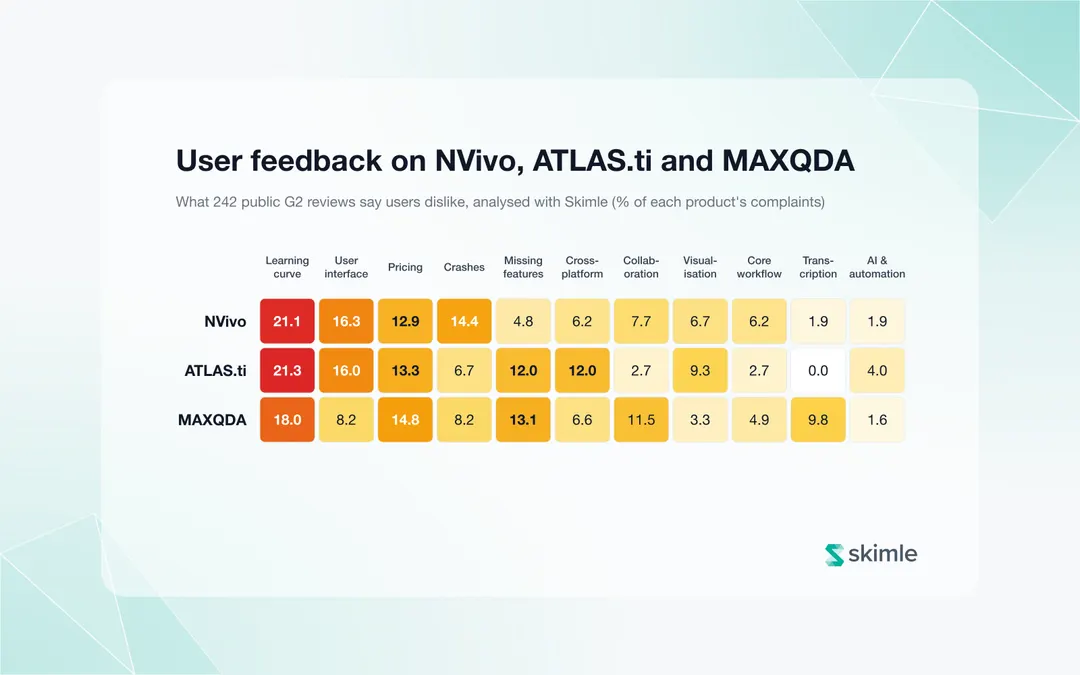
The traditional CAQDAS packages (computer-assisted qualitative data analysis software, explained in full here) were built for professional researchers running multi-year projects. NVivo, ATLAS.ti, and MAXQDA each carry decades of accumulated features: matrix queries, code hierarchies, case classifications, framework matrices, network views. Powerful, but the interfaces assume you already think in the tool's vocabulary before you open it. How hard they are to learn shows in user feedback: in our analysis of 242 G2 reviews of NVivo, ATLAS.ti and MAXQDA, the learning curve was the single most common complaint for all three.
The evidence for the learning burden is easy to find:
- Delve's comparison of QDA software learning curves estimates that getting comfortable with basic coding takes 5 to 7 days in NVivo, 2 to 3 days in ATLAS.ti, and 3 to 4 days in MAXQDA. Their arithmetic is worth repeating: on a six-week project with roughly 90 working hours available, spending one to three days learning software consumes 17 to 33 per cent of your total research time before you have analysed anything.
- Universities have built entire support infrastructures around these tools. Simon Fraser University's library runs ongoing NVivo workshops, weekly drop-in office hours, one-on-one consultations, and a dedicated "NVivo Grad Peers" programme. A tool that needs a standing peer-support scheme to be usable is, by definition, not easy to learn.
- A 2026 analysis of where teams struggle with ATLAS.ti puts it plainly: "ATLAS.ti assumes formal qualitative methods training", and new users struggle with complex terminology and non-obvious workflows, to the point that some teams delayed their analysis because onboarding took longer than expected. User reviews on Capterra are mixed on the same point: some researchers pick it up in days, others warn that without formal training "it could slow down your learning".
None of this makes the legacy tools bad. It makes them a poor fit for a first project on a deadline and also means many analysts in e.g., business setting keep using familiar workarounds like Excel or Word instead of picking them up.
If price rather than learning curve is your main constraint, the free qualitative data analysis software roundup covers the zero-cost options in depth.
How did AI change what "easy to learn" means?
Until recently, every QDA tool worked the same way underneath: you read each document, decide what matters, and attach a label. The tools differed only in how pleasant they made that manual process. So "easiest to learn" meant "simplest coding interface", and tools like Taguette, Delve, and Quirkos won by stripping features away.
AI-native tools change that equation. In a tool like Skimle, the software reads the full corpus, extracts the meaningful excerpts, and proposes a structured set of categories with every excerpt linked back to its source. Your job starts where the machine's ends: reviewing the suggested structure, renaming and merging categories, challenging and editing what the AI found, and adding what it missed. There is less interface to learn because there is less manual mechanics to perform. The skills you need is analytical judgement and domain knowledge... which are the skills you were supposed to be practising anyway.
This matters for the "easiest software" question in a specific way. A beginner using a simple manual tool still faces the hardest part of qualitative analysis alone: staring at 200 pages of transcripts wondering what counts as a code. A beginner using an AI-native tool starts from a draft, and critiquing a draft is far easier than writing on a blank page. For a longer discussion of what AI assistance does and does not change methodologically, see the AI document analysis guide.
With that framing, here are the five easiest tools to learn in 2026, ranked from simplest manual option to fastest overall route to findings.
The 5 easiest qualitative analysis tools for beginners, ranked
1. Skimle: the fastest route from documents to findings
Time to first reviewed analysis: minutes for the AI pass, under an hour to a refined category structure.
Skimle is the one tool on this list where "easy to learn" does not mean "simple manual coding". You create a project, upload your documents, and the AI reads the entire corpus and returns a structured, multi-level category hierarchy with every insight linked to the exact source passage. The first-project walkthrough fits on one page because there is little to configure: upload, let the automatic thematic analysis run, then review, rename, merge, and challenge what it found. Manual coding, transcription of audio, and anonymisation are built in when you need them, and REFI-QDA export means the project can move to NVivo or MAXQDA later if a supervisor requires it.
The learning curve shifts rather than disappears. You spend almost no time on interface mechanics and all of your time on the judgement work: does this category structure make sense, what did the AI miss, where would I have cut the data differently? For a beginner, that is a far better use of limited hours, but it does require engaging critically with the output rather than accepting it. Skimle has a free tier with 200 credits, with paid plans from €20 per month.
For a first-time researcher, the practical difference is stark: the question changes from "how do I code 20 interviews before my deadline" to "what is the data telling me?. If you work in academia, here is how Skimle fits an academic workflow; if you are a professional who inherited qualitative data without formal training, the curious professionals page speaks to exactly that situation.
Best for: anyone whose goal is defensible findings and in-depth understanding, rather than getting stuck in manual coding mechanics.
2. Taguette: the simplest free option
Time to first coded document: about 45 minutes.
Taguette is free, open source, and deliberately minimal. As NYU's library guide describes it, you import documents (PDF, Word, text, and several other formats), highlight passages, attach tags, and export the results. That is essentially the whole feature set, which is exactly why it is easy: the interface maps directly onto the highlighters-on-paper mental model everyone already has. A hosted server at app.taguette.org means you can skip installation entirely.
The simplicity has a price. There are no nested code hierarchies, no memoing to speak of, no queries, no visualisations, and no AI assistance. For a small classroom exercise or a first pilot study of five interviews, none of that matters. For a dissertation with 25 transcripts, you will feel the ceiling within a fortnight.
Best for: zero-budget users doing a small, simple manual coding project.
3. Quirkos: the friendliest visual interface
Time to first coded project: about an hour.
Quirkos represents codes as coloured bubbles that grow as you drag more text onto them, which gives beginners something rare in this category: immediate visual feedback that the analysis is progressing. The design philosophy, per Quirkos's own site, is "just the essential tools you need", and it holds up in practice. Pricing is also beginner-friendly: cloud subscriptions from $5 (€5) per month and a one-off offline licence at $69 (€65), which undercuts most of the field.
Like Taguette, Quirkos is a manual coding tool. You do all the reading and labelling; there is no AI first pass. It is a lovely way to learn hand-coding, and a slow way to analyse a large corpus.
Best for: students and small-scale researchers who want manual coding with the gentlest possible interface.
4. Delve: the fastest manual onboarding
Time to first codes: hours
Delve is a web-based coding tool built explicitly around ease of learning, and it delivers on that promise: sign up, upload a transcript, highlight, code. Delve's own onboarding estimate is ten minutes to a working setup, and independent write-ups broadly agree that it is the quickest of the manual tools to start using. It has added AI features around the edges (an AI chat that acts as a peer debriefer, and AI checks on your existing codes), though the core workflow remains you doing the coding. Pricing is $18 (€17) per user per month on the education plan and $50 (€46) per user per month on the standard plan.
The trade-off is depth: analysis features beyond coding and simple comparison are thin, and on a per-month basis the standard plan is expensive relative to what the tool does. Our full Delve review covers the feature set, pricing, and alternatives in detail.
Best for: first-time academic coders who want the quickest manual start and easy team comparison.
5. Dedoose: easy to access, harder to love
Time to first coded project: 30 minutes to set up, days to feel fluent.
Dedoose earns its place on ease-of-access grounds: fully browser-based, works identically on any operating system, collaboration included in the base price of roughly $18 (€17) per month (about $13 (€12) for students), and built-in interrater reliability statistics that the cheaper tools lack. Set-up is quick.
The catch is that the interface itself is dated and less fluid than the newer tools, so the initial learning curve is steeper than the feature set would suggest, and there is no AI assistance at all. It sits on this list because mixed-methods beginners who need descriptor variables and multiple coders get capabilities here that Taguette, Quirkos, and Delve cannot offer at the price. Our Dedoose review goes through the strengths and limitations in full.
Best for: beginner teams that need collaboration and interrater reliability on a budget.
How do the easiest QDA tools compare side by side?
| Tool | Learning curve | Time to first coded project | Price | AI help |
|---|---|---|---|---|
| Taguette | Minimal, maps to highlighting on paper | ~45 minutes | Free, open source | None |
| Quirkos | Minimal, visual bubble interface | ~1 hour | $5 (€5)/month cloud; $69 (€65) one-off licence | None |
| Delve | Very low for coding basics | 10-30 minutes | $18 (€17)/month education; $50 (€46)/month standard | AI chat and code checks, coding is manual |
| Dedoose | Low to access, moderate to master | ~30 minutes setup, days to fluency | ~$18 (€17)/month; ~$13 (€12) student | None |
| Skimle | Low; effort goes into reviewing, not mechanics | Minutes for AI pass, 1 hour to refined structure | Free tier (400 pages); from ~$23 (€20)/month | AI-native: full first coding pass, traceable to source |
| NVivo (reference) | 5-7 days for basics | Days to weeks | ~$118 (€110)/year student; $295-595 (€270-550)/year | Add-on AI features on a manual core |
| ATLAS.ti (reference) | 2-3 days for basics | Days | $395-595 (€360-550)/year | Add-on AI features on a manual core |
The last two rows are there for calibration. If you are choosing between the legacy packages rather than avoiding them, the NVivo and MAXQDA alternatives guide and the ATLAS.ti alternatives guide map that terrain properly, and the general buyer's guide to qualitative analysis software compares the whole market beyond the beginner-friendly segment. Mac users have one extra wrinkle (NVivo's Mac version lags its Windows sibling), covered in the QDA software for Mac guide.
When is easy not enough?
A fair ranking needs the counter-case. There are situations where the easiest tool is the wrong tool:
- Your methodology requires manual immersion. Grounded theory done properly, interpretative phenomenological analysis, and some discourse-analytic traditions treat line-by-line manual engagement as part of the method, not overhead to be automated away. If your methods chapter commits you to open coding by hand, a simple manual tool (or even a powerful one) is the correct choice, and how to code qualitative data walks through what that involves.
- You need interrater reliability with multiple human coders. Dedoose remains the budget pick here; the very simplest tools cannot calculate Cohen's kappa for you.
- You are being taught, and coding is the lesson. In a methods classroom, the instructor may want students to feel the full weight of manual coding before any AI assistance enters the picture, though there is a real argument that this ordering is backwards; the best tool for teaching qualitative analysis takes that question on directly.
- Your institution mandates a specific package. If peer reviewers or a doctoral committee expect NVivo outputs, factor the learning curve in as a real cost and start early.
For everyone else, and that includes most first-time researchers and nearly all professionals analysing interviews outside academia, ease of learning is not a guilty compromise. Time not spent fighting software is time spent thinking about the data, and thinking about the data is the entire point. If thematic analysis itself is new to you, demystifying thematic analysis is a friendly starting place.
Frequently asked questions
What is the easiest free qualitative data analysis software?
Skimle's free tier (200 credits) is the easiest free route to AI-assisted findings. The free QDA software roundup compares all the zero-cost options. Among legacy tools, Taguette is the easiest fully free option: open source, browser-based via its hosted server, and learnable in under an hour because it only does highlighting and tagging.
How long does it take to learn NVivo?
Estimates converge on roughly a week for basic competence: Delve's comparison puts it at 5 to 7 days to feel comfortable with basic coding, and universities routinely run multi-session workshop series plus weekly office hours to support it. Advanced features like matrix queries take considerably longer. For a project measured in weeks rather than years, that is a significant share of your total time.
Can beginner-friendly software produce rigorous analysis?
Yes. Rigour lives in the analytical process (systematic coding, traceable evidence, reflexive interpretation), not in the software's feature count. A simple tool used carefully beats a powerful tool used badly. The one thing to verify is traceability: whatever tool you choose, you should be able to trace every finding back to the passage that supports it, which both careful manual coding and Skimle's source-linked AI analysis provide.
Is AI-assisted qualitative analysis acceptable in academic work?
Increasingly yes, provided you disclose it, review the output critically, and can trace every claim to source data. Journals and ethics boards care about transparency and researcher judgement rather than banning tools outright. Check your institution's current guidance, describe your process in the methods section, and treat the AI's first pass as a draft you are accountable for, not a result you accept.
Should I just use ChatGPT instead of dedicated QDA software?
For a handful of documents and informal questions, a general chatbot can be useful. For real analysis it falls short in two ways: context limits mean it cannot systematically process a large corpus, and it produces summaries with no audit trail from claim back to source. Dedicated tools, whether manual or AI-native, exist precisely to keep that chain of evidence intact. Read more in our "Can ChatGPT be used for qualitative analysis" article.
About the authors
Henri Schildt is a Professor of Strategy at Aalto University School of Business and co-founder of Skimle. He has published over a dozen peer-reviewed articles using qualitative methods, including work in Academy of Management Journal, Organisation Science, and Strategic Management Journal. His research focuses on organisational strategy, innovation, and qualitative methodology. Google Scholar profile
Olli Salo is a former Partner at McKinsey & Company where he spent 18 years helping clients understand the markets and themselves, develop winning strategies and improve their operating models. He has done over 1000 client interviews and published over 10 articles on McKinsey.com and beyond. LinkedIn profile
Sources
- Which qualitative data analysis software is easiest to learn? - Delve
- ATLAS.ti qualitative software: what it's good at and where teams struggle - UserCall
- ATLAS.ti reviews - Capterra
- NVivo training - Simon Fraser University Library
- Taguette - NYU Libraries qualitative data analysis guide
- Quirkos - qualitative data analysis software made simple
- Delve - qualitative data analysis software