Managing questions
Add and configure questions for your Ask project.
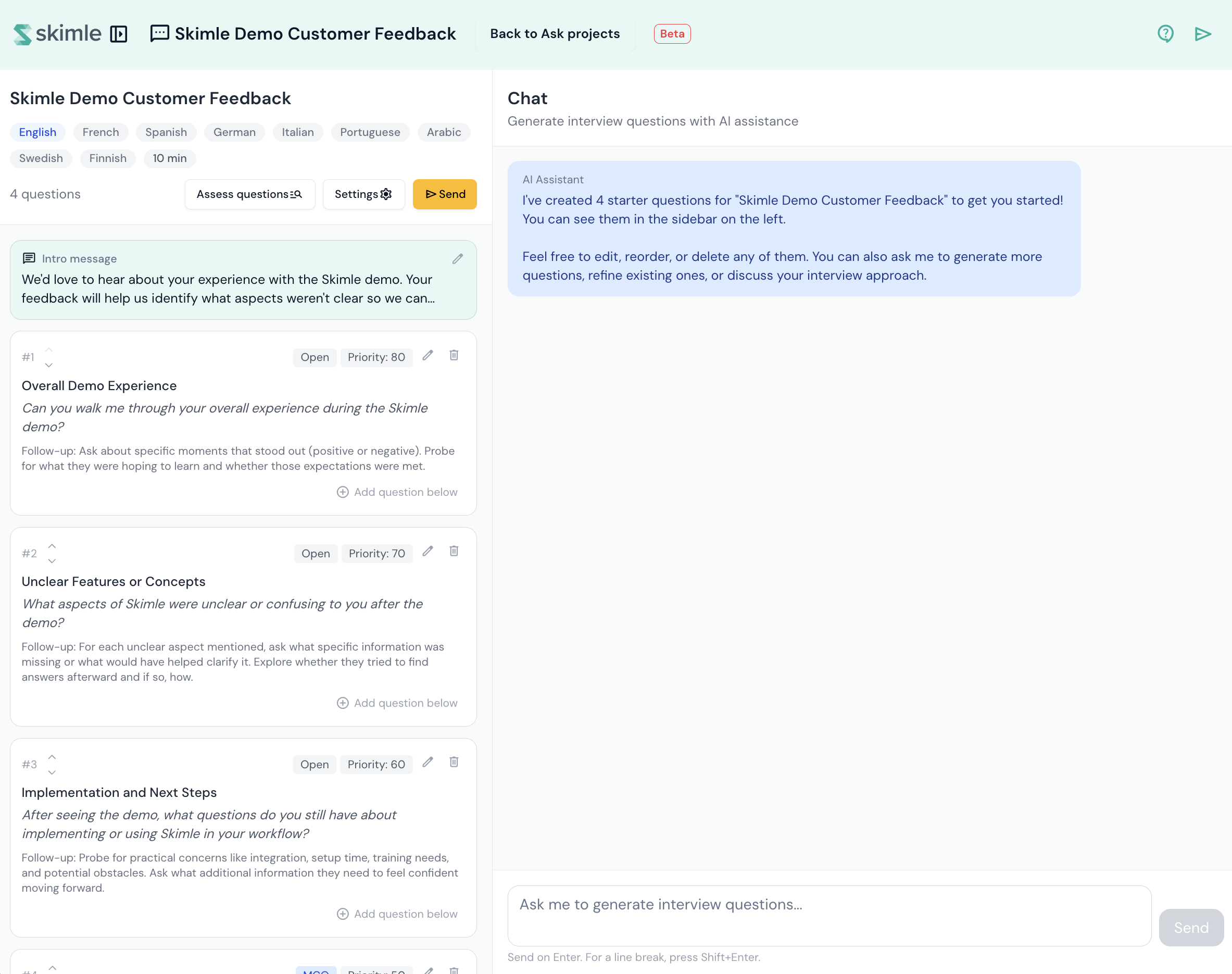
The question editor is where you design and refine your interview. It uses a split-screen layout: the left panel lists your questions, and the right panel provides an AI chat assistant to help you generate new ones.
Question types
Each question has a type that determines how respondents answer:
- Open-ended — respondents type a free-text answer. The AI can ask follow-up questions to probe deeper.
- Multiple-choice — respondents select from 2 to 6 predefined options. Follow-up questions are not asked by default.
Editing a question
Click a question in the left panel to edit it. Each question has the following fields:
- Theme — a short topic label (e.g. "Onboarding", "Pricing"). Themes are shown to respondents as progress markers during the interview.
- Question text — the actual question. This can be multiple lines.
- Follow-up instructions — guidance for the AI on what to explore further. For example: "Ask about specific examples" or "Probe for emotional reactions". These instructions are not shown to respondents.
- Max follow-up depth — how many times the AI can ask follow-up questions (0 to 4). A depth of 0 means no follow-ups. Higher depths allow the AI to dig deeper, but it will only ask follow-ups when the respondent's answer warrants it.
- Priority — a value from 0 to 100 that influences question ordering.
For multiple-choice questions, you also define the answer options (2 to 6 choices).
Adding questions with AI
Use the chat panel on the right to generate new questions. Describe what you want to ask and the AI will suggest questions based on your project context and existing question set.
You can also use the AI to critique your existing questions. This checks for clarity, potential bias, and topic coverage.
Reordering questions
Drag and drop questions in the left panel to change their order. The order determines the sequence in which respondents are asked questions during the interview.
Deleting questions
Click a question to select it, then use the delete option to remove it from your project.
Once your questions are ready, share the interview link with your respondents.
How follow-ups work
When a respondent answers an open-ended question, the AI evaluates whether the answer is complete. If it detects that the respondent gave a vague or partial answer, it asks a follow-up question guided by your instructions.
The AI stops asking follow-ups when:
- The respondent has answered thoroughly.
- The respondent gives a dismissive answer (e.g. "I don't know").
- The maximum follow-up depth has been reached.
At higher depths (3 to 4), the AI becomes more selective and only follows up on critical details.